Leveraging Prompts and Orchestrations for the Right Tasks
The difference between a prompt and an orchestration isn't the output, it's the complexity. Here's how to know which one fits your work.
Suraj Palaparty6 min read
Prompts are the foundation of any agentic platform, type out your request and then receive your response – it’s straightforward by design so anyone can leverage the power of AI. This design is great to leverage for any simple tasks: question and answer, a straightforward summary or review, email drafts, among other things. But when your work becomes a complex, multi-step process, a single prompt becomes flat. Sofie is agentic by design built to handle complex orchestrations where multiple specialized agents work together across your workflow, from research and analysis to drafting and compliance review, autonomously.
Orchestrations are critical to how biopharma teams use Sofie today (don’t take our word for it, this is straight from our pilot users):
- Users need deep capabilities for things like batch release report, a deviation investigation, and process transfer plans.
- Sofie coordinates specialized agents across research, analysis, drafting, and compliance review — working through multi-step workflows autonomously so teams get audit-ready deliverables, not chat responses.
- Teams see 60–80% time savings per workflow and improve 10–15 workflows in their first 30 days, returning hundreds of hours each month.
The Goal of a Prompt
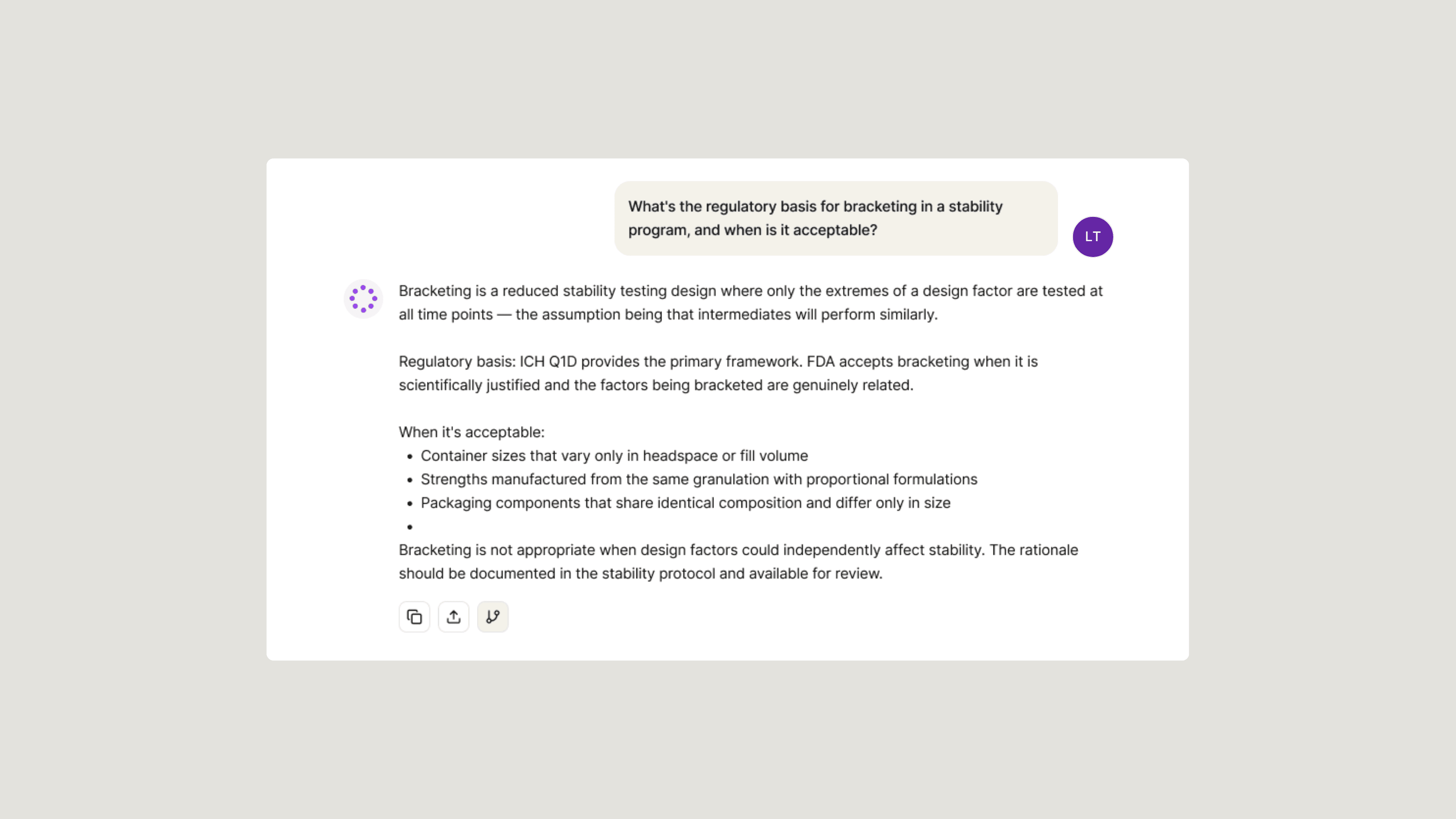
Building a thorough prompt is a powerful thing but they can require more detailed instruction and context when we are working on complex tasks. Think of a prompt as a single conversation turn where input equals one output. There can be iterations and new drafts but any deep contextual tasks may lack structural integrity or return a narrow response. This is the fundamental structure of a prompt and how the AI model works to return an answer, everything is happening all at once: context is being gathered, documents being structured and filled with content, and regulatory content is being applied. Everything is done in one seamless execution without memory of prior steps, checkpoints, distinct phasing, or human oversight.
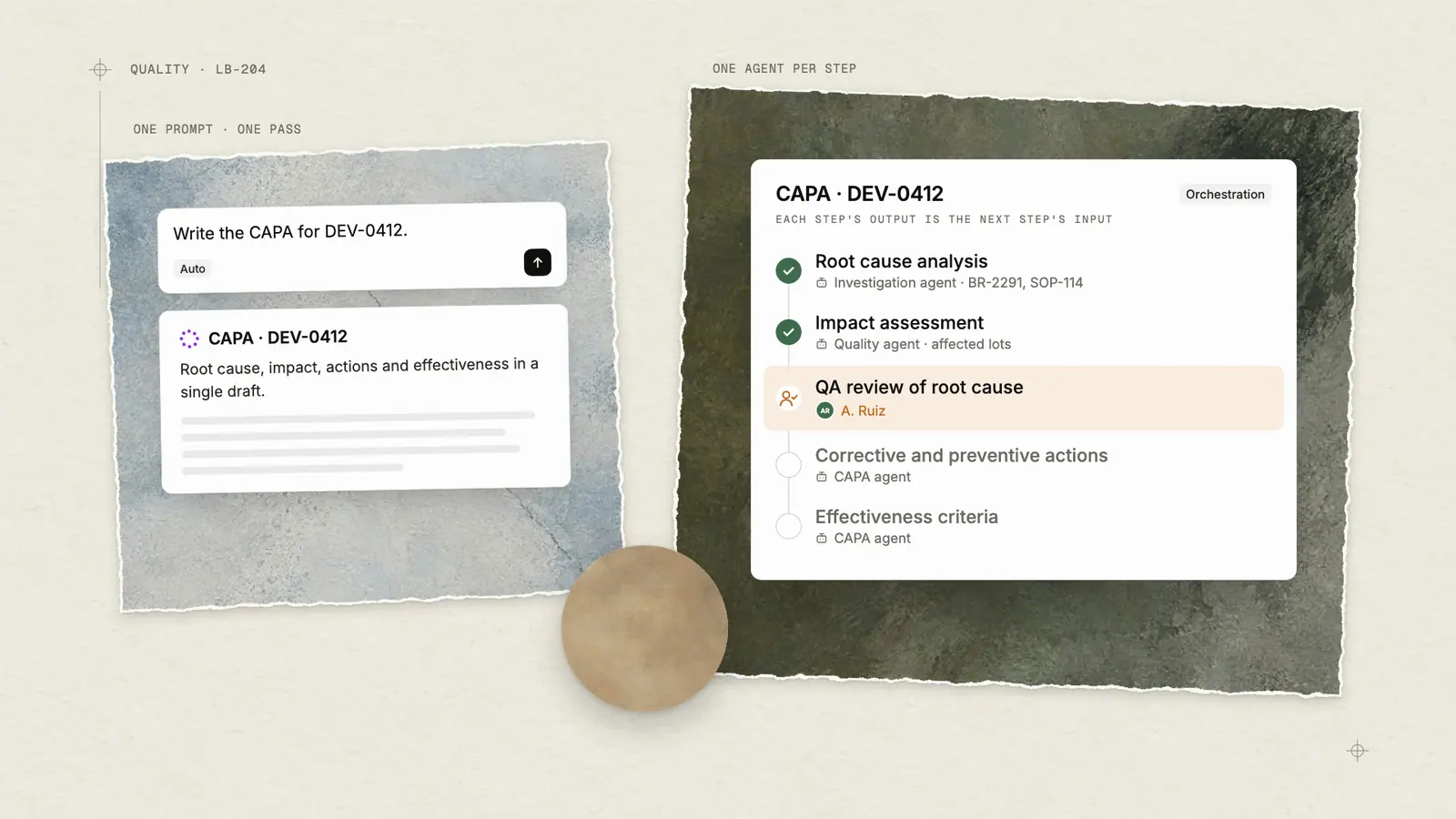
Ask Sofie to write a full CAPA report from a single prompt and it will, you’ll have a complete draft in minutes. But a CAPA isn't one task–It's root cause analysis, then impact assessment, then corrective actions, then effectiveness criteria where each step is informed by the one before it. A prompt may compress and blend steps that should be distinctive and thorough producing a complete output that may be too cursory for the complexity of the task at hand.
The Unique Design of an Orchestration
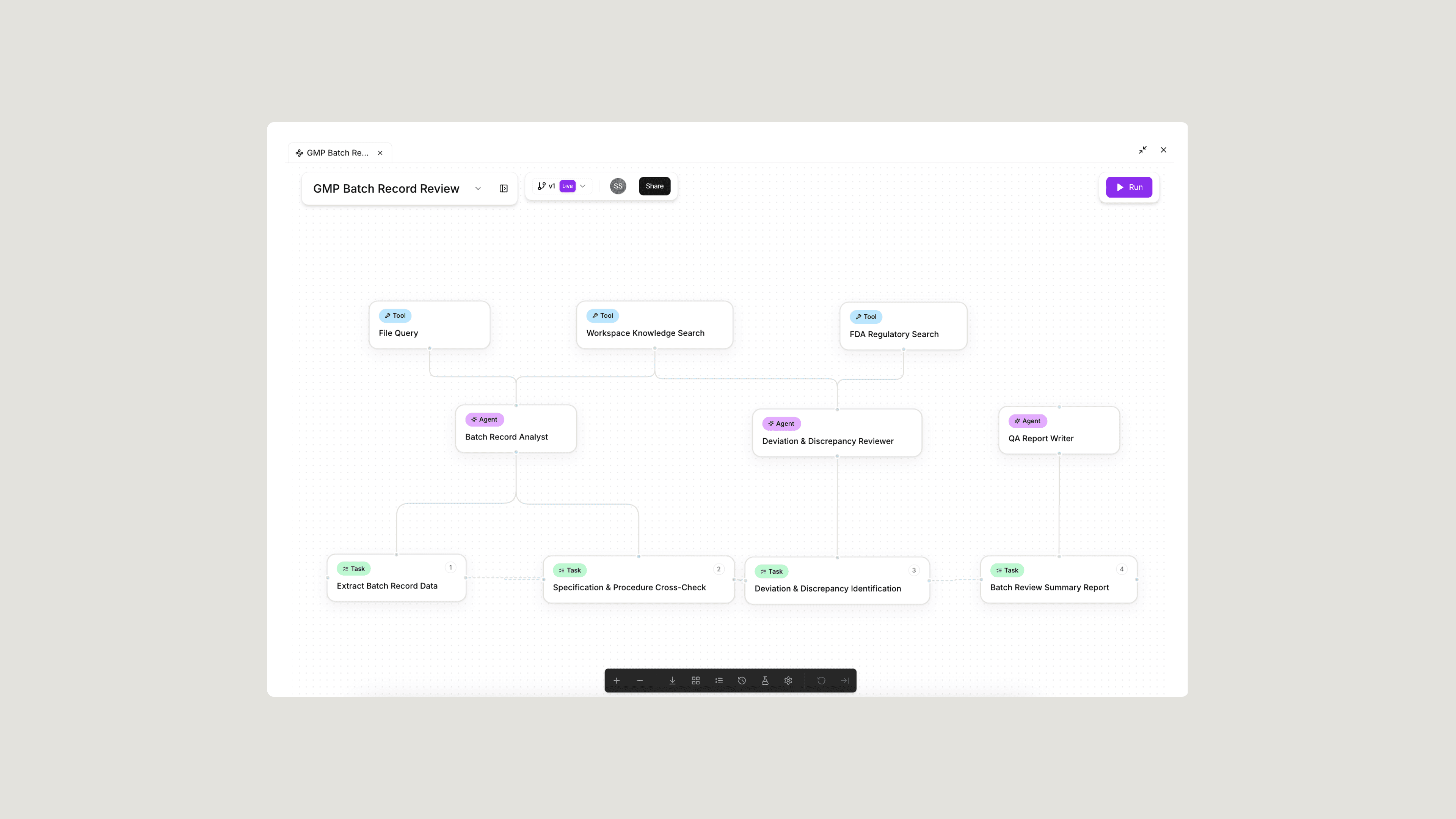
Orchestrations take fuller advantage of our multi-model design to focus on your goal, research, analyze, draft, and cross-check in sequence so that you have a complete, structurally sound draft. Rather than rigidly sweeping across a fixed set of steps, Orchestrations break each goal into a sequence of focused tasks, each executed by a specialized AI agent with a defined role and a specific scope. This approach creates a connected flow of steps in which each task is delegated to the right agent at the right time, then each step’s output becomes the verified input for the next step of the workflow.
This is meant to reflect the way your teams work today. Think of a technical team, a requirements analyst gathers the inputs, a subject matter expert drafts the document, and a quality reviewer validates the output against regulatory standards. Each person has a goal, each step is explicit, each output leads to the next until the workflow is complete.
For a simple task, the difference in output between a prompt and an orchestration is slight. As the tasks our pilot users tackle continues to evolve, it's become more apparent that Orchestrations hold deep power when a task requires:
- Contextual depth: When a task depends on rich source material — lot numbers, event timelines, reference SOPs, prior deviation history — an orchestration dedicates a focused agent to gathering, organizing, and verifying that information before drafting begins. The result is a structured foundation that carries forward into every downstream step, so the final output reflects the full depth of available context rather than a surface-level pass.
- Role specialization: Each agent in an orchestration is built with a distinct role — different expertise, different instructions, different evaluation criteria. Separating these roles by design ensures each step is executed with the focus and precision it demands, rather than blending generation and evaluation into a single pass.
- Verification loops: Orchestrations are designed with deliberate oversight and human-in-the-loop engagement so that your team makes the integral decisions that require their expertise. As an agent moves through tasks, it challenges the inputs, flags gaps and highlights inconsistencies where human input refines the results. For a quality team, that could mean investigating a deviation during aseptic fill — starting with a detailed review of batch records, environmental monitoring data, and SOPs to generate a CAPA. The orchestration connects those steps, keeping you involved where it matters most: confirming scope and evaluating root cause logic before the report is drafted.
Knowing When to Use Each
Understanding the difference between prompts and orchestrations isn't theoretical — it's practical. The best teams use both, constantly. The deciding factor is straightforward: if the task is one question, one document, or one transformation, a prompt gets you there. If it requires gathering from multiple sources, applying different types of expertise at each step, or producing a structured deliverable with checkpoints along the way, that's where an orchestration earns its value.
Here's how that plays out across the workflows biopharma teams run every day.
3 Examples of When to Use a Prompt
- Regulatory Q&A — A single question grounded in guidance that returns a direct, sourced answer. No multi-step workflow needed.
- Meeting and document summaries — The input is self-contained and the output is a condensed version of what's already there.
- Risk brainstorming — You want a starting list of failure modes to react to, not a scored assessment.
5 Examples of When to Use a Orchestration
- Deviation Investigation Report — Agents gather SOPs, batch records, and historical deviations, then draft the impact assessment and root cause analysis with pause points for investigator review before the CAPA is proposed.
- GMP Batch Record Review — Multiple sections of a batch record need to be checked against specs, deviations flagged, and a structured summary generated — too many cross-references for a single prompt to hold reliably.
- Validation Protocol Generation — A risk-based protocol requires pulling equipment specs, regulatory requirements, and acceptance criteria from different sources, then assembling them into a compliant document structure.
- CDMO Development Report — Experimental data, process parameters, and analytical results need to be analyzed and synthesized into a client-facing deliverable with defined sections and formatting.
- Annual Product Review (APR/PQR) — A year's worth of batch data, quality events, trending analysis, and stability data need to be compiled, reviewed for patterns, and assembled into a regulatory-ready report.
What's outlined here is a starting point. When Sofie deploys to your site there is a prebuilt library of orchestrations across tech transfer, supply chain, cell and gene therapy, commissioning and validation, and quality management each designed around how biopharma teams actually work. And if your workflow isn't in the library, you can build it yourself.
The Bottom Line
Orchestrations help give biopharma teams a foundation for scaling complex work – one that adapts to your expertise, your standards, and your pace. This can help biopharma teams stay focused on the decisions and work that actually move things forward. Prompts keep the simple things simple — fast answers, quick drafts, and one-off tasks that don't need a multi-step workflow to get right.
Looking ahead, we're continuously investing in expanding orchestration capabilities across the platform. This includes deeper human-in-the-loop controls, broader integration with enterprise systems like QMS and LIMS, and a growing library of prebuilt orchestrations as well as a prompt library shaped directly by how our pilot teams work every day.
If you want a fresh set of high-impact ideas tailored to your use of Sofie, request a 1:1.
Insights
All insights