Introducing Orchestrations: Build and Deploy End-to-End Biopharma Workflows
Sofie’s latest release introduces Orchestrations: purpose-built AI workflows that turn your team’s process knowledge into repeatable, high-quality execution without changing the way you work.
TransferAI Team9 min read
Biopharma operations are built on deep institutional knowledge: the SOPs, validated methods, decision paths, and operational expertise your teams have built over years. But much of that knowledge still lives across documents, systems, meetings, spreadsheets, and individual experts. That is why we’re excited to introduce orchestrations: a way to turn the way your organization already works into repeatable, AI-powered workflows built for the realities of biopharma.
Instead of forcing your processes into generic AI tools like ChatGPT or Copilot, Sofie works around your existing operating model, your terminology, your documents, your systems, and your decision points. The result is faster execution without losing the judgment, context, and oversight that regulated work requires.
We’re proud to be rolling out orchestrations alongside forward-thinking teams across the industry, including CDMOs, full-service AEC firms, and biotech organizations. Their insights and feedback have helped shape this major new capability, and we’re excited to give them access to a new way of executing complex, multi-step work across technical documentation, quality processes, project execution, and operational decision support.
"CMC is where every delay has a downstream consequence. Before orchestrations, pulling together a tech transfer package meant chasing documents across multiple systems and inboxes. Now, you can run a whole workflow in one place and review outputs instead of coordinating disconnected work."
What Orchestrations Are and Why They Matter
Most AI tools assist with individual tasks: answering a question, drafting a document, summarizing a file, or analyzing a dataset. Orchestrations execute complete business processes. They turn defined work into reusable, AI-powered workflows that Sofie runs step by step.
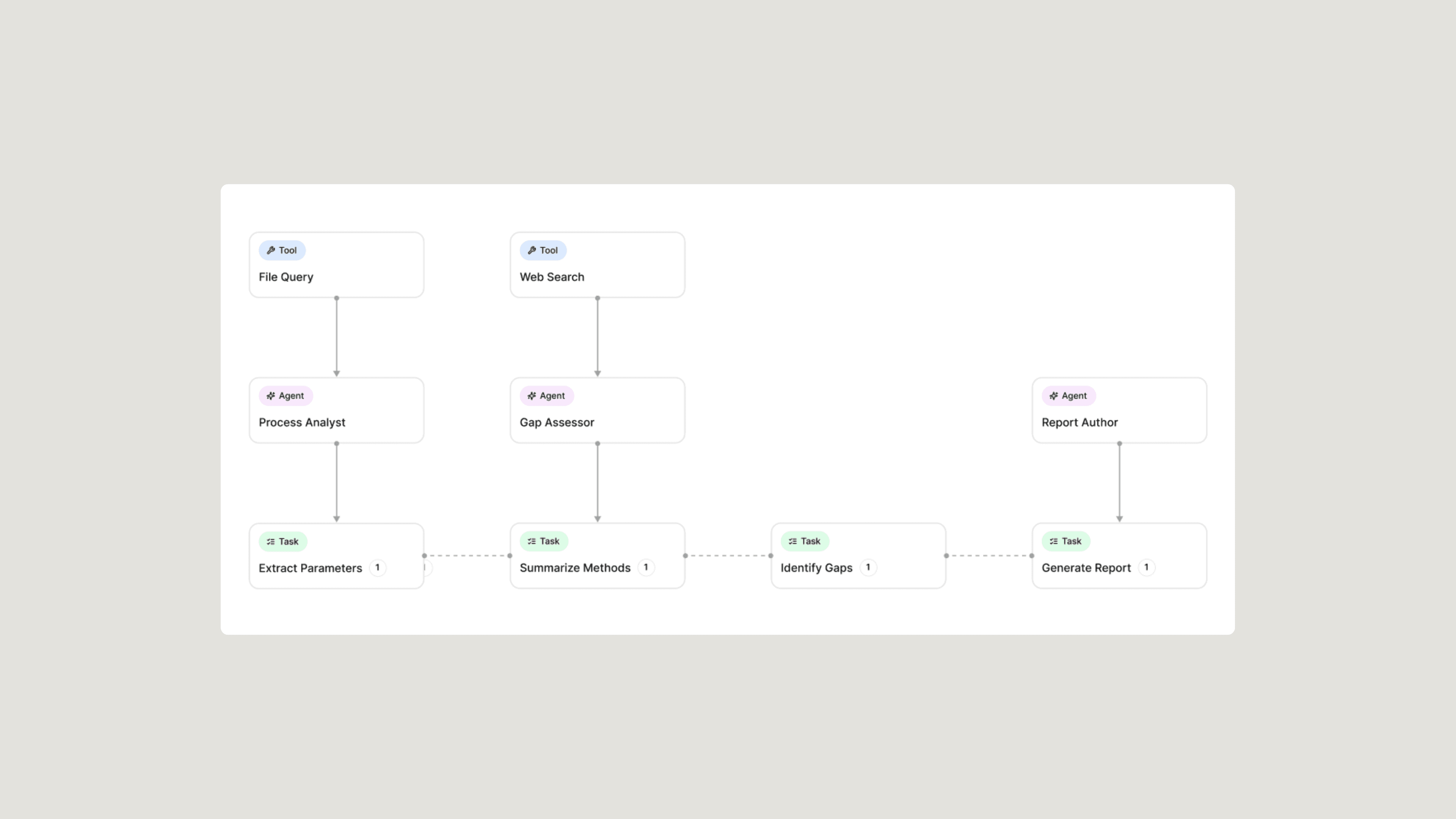
Each orchestration is built around a specific outcome. It includes multiple AI agents, each with a defined role, the right tools, and the right context from your documents, data, systems, and prior work. Instead of prompting Sofie one step at a time, your team runs a structured workflow that follows the sequence your process requires. The orchestration gathers the right inputs, reviews the relevant source material, compares information, identifies gaps, drafts the output, and prepares it for expert review.
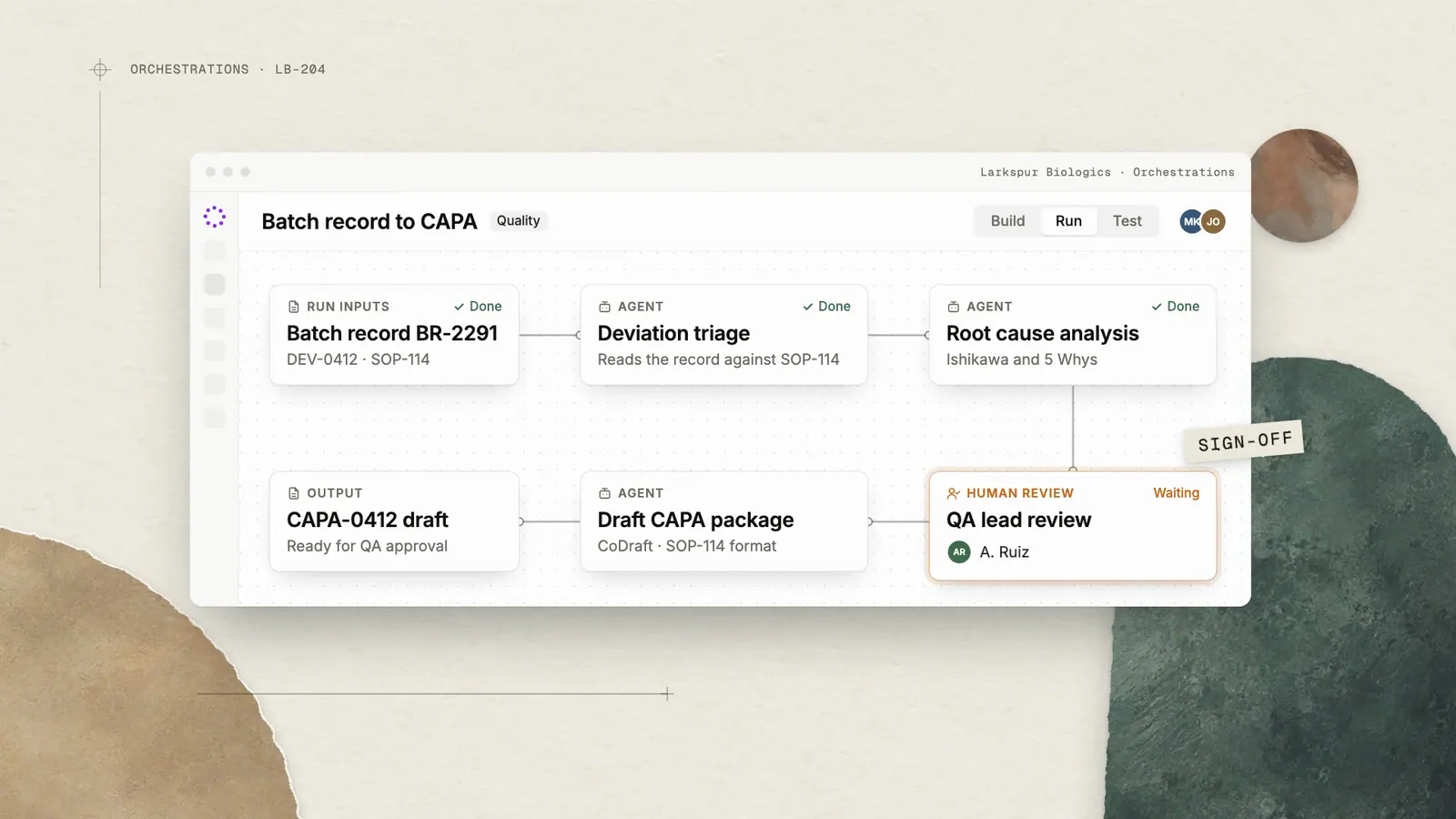
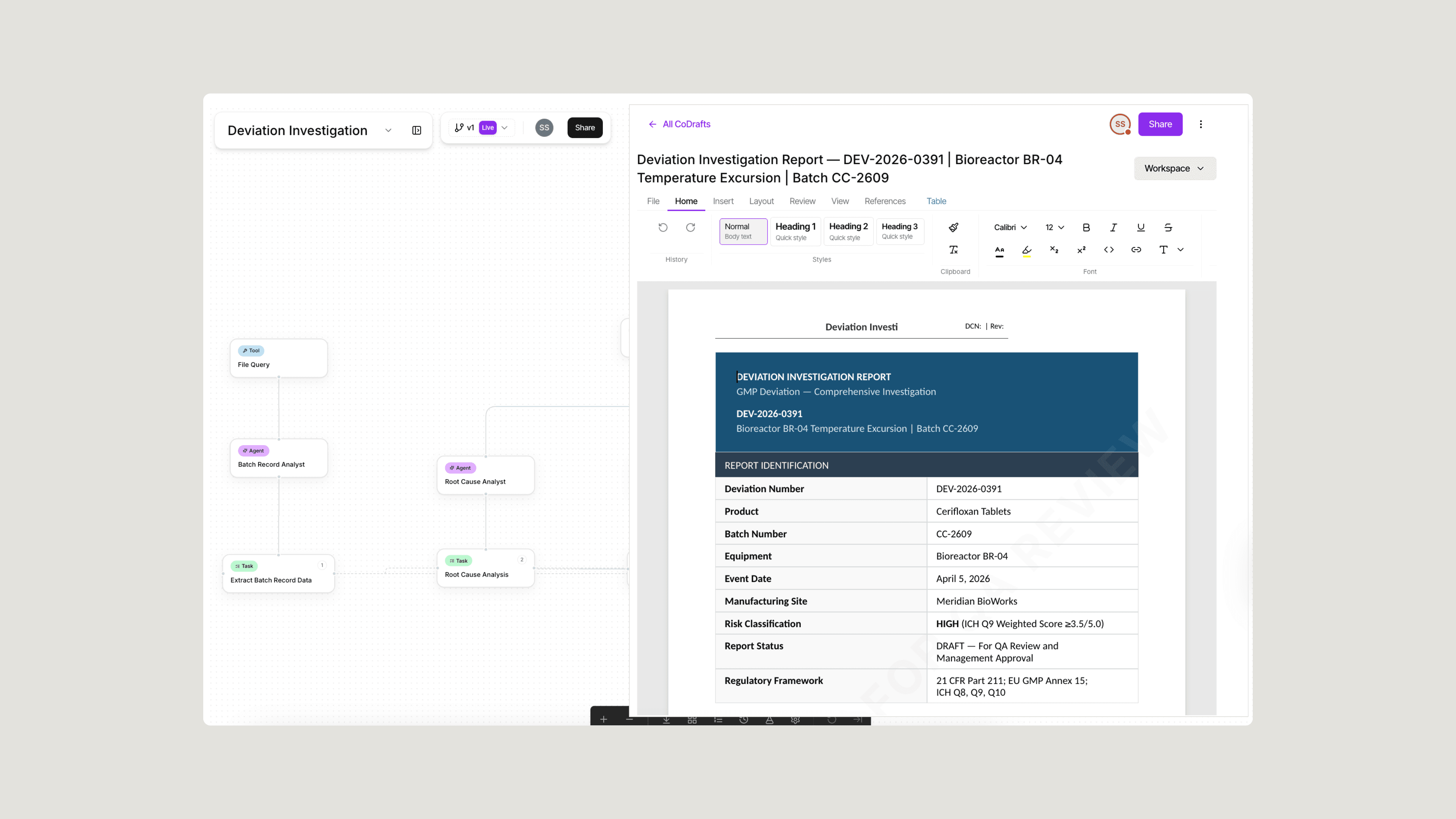
A quality orchestration reads a batch record, identifies potential deviations, pulls relevant SOPs, supports root cause analysis, and drafts a CAPA package for review. A stability orchestration monitors study data, flags out-of-trend results, and prepares a regulatory-ready summary. A tech transfer orchestration compares a sending site's process parameters against a receiving site's capabilities and surfaces the gaps your team needs to resolve.
Orchestrations turn your team’s expertise, SOPs, and best practices into repeatable execution: faster work, more consistent outputs, clearer traceability, and more time for experts to focus on the decisions that require their judgment.
“After 25 years in biopharma, I’ve seen how much time gets lost before the real technical review even begins: finding the right files, reconciling versions, pulling together run history, comparability data, and prior reports. What stood out in testing orchestrations was not just the speed. It was that the work arrived already assembled in the sequence I would expect, so I could focus on judgment instead of chasing inputs.”
How It Works
Orchestrations are built and run by the people closest to the work. That might be a scientist, quality lead, operations manager, project owner, analyst, consultant, or any team member who sees a repetitive workflow. If your team repeats a process that depends on the same inputs, steps, reviews, and outputs, it may be a strong fit for an orchestration.
You do not need code or a technical specification. Start with the workflow itself: what needs to happen, what information is required, which steps come first, what the output should look like, and where human review belongs.
From there, Sofie converts that process knowledge into a structured, reusable workflow, ready to run on demand.
Before You Build or Run an Orchestration
Strong orchestrations start with the right inputs. Before building or running one, identify the workflow, the materials Sofie should use as context, and the output your team expects to review.
- Set the right workspace as the source of truth. Scope the workspace to the project, product, site, or process you want the orchestration to use. Workspaces are where Sofie organizes the context an orchestration can reference, whether that information is uploaded directly or connected through integrations. Load or connect current, approved materials such as SOPs, batch records, tech transfer documents, deviation history, stability data, prior reports, or other relevant files.
- Use clean inputs. Orchestrations are only as strong as the information they are given. Keep outdated drafts, duplicate files, and irrelevant materials out of the run when possible.
- Show Sofie what “good” looks like. If you know what a good final output should look like, share it with Sofie before you run the workflow. That applies whether you are building from scratch, cloning a prebuilt orchestration, customizing one your team already uses, or preparing to run a workflow from the library. A good example might be a prior deliverable, preferred outline, structured table, completed report, customer-facing output, or formal template. You can provide it while describing the workflow, attach or reference it on the orchestration screen, or include it in the workspace the orchestration will use. Sofie can then help shape the workflow around the result your team expects.
- Start with human review at the final output, then add checkpoints where they matter. For your first orchestration, the simplest approach is to review the completed output before using, sharing, or approving it. As your team gains confidence, you can add human-in-the-loop checkpoints inside the run, such as after an agent completes a key task, before the next step begins, before a conclusion is drafted, or whenever your team wants review, approval, or additional input before Sofie continues.
Start From Scratch or Use the Prebuilt Library
There are two ways to get started with orchestrations. You can build from scratch by telling Sofie what you want in plain language. For example, you might ask Sofie to create a workflow that reviews a batch record, identifies potential deviations, pulls relevant SOPs, drafts an investigation summary, and prepares a CAPA package for review.
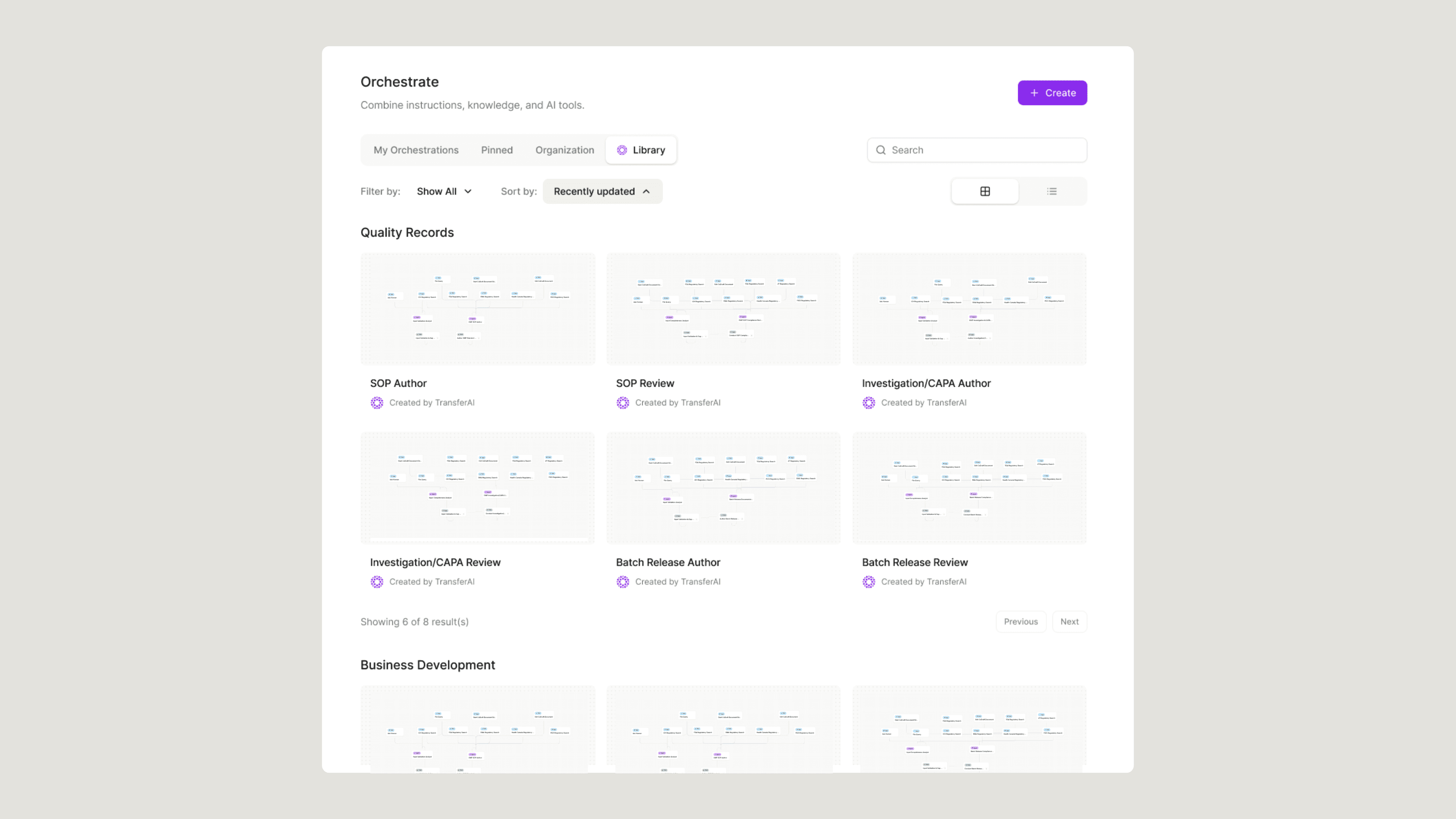
You can also start from the prebuilt library. The library includes 30+ orchestration templates across areas like tech transfer, deviation investigation, batch release, regulatory response, stability review, and operational planning. Each prebuilt orchestration includes a workflow card that explains what it does, what inputs it needs, and what outputs it produces. From there, clone a workflow, run it as-is, or tailor it with a file, workspace, or example of what good looks like so Sofie can adjust the logic, review points, and output structure to match your standards.
Building or Customizing an Orchestration
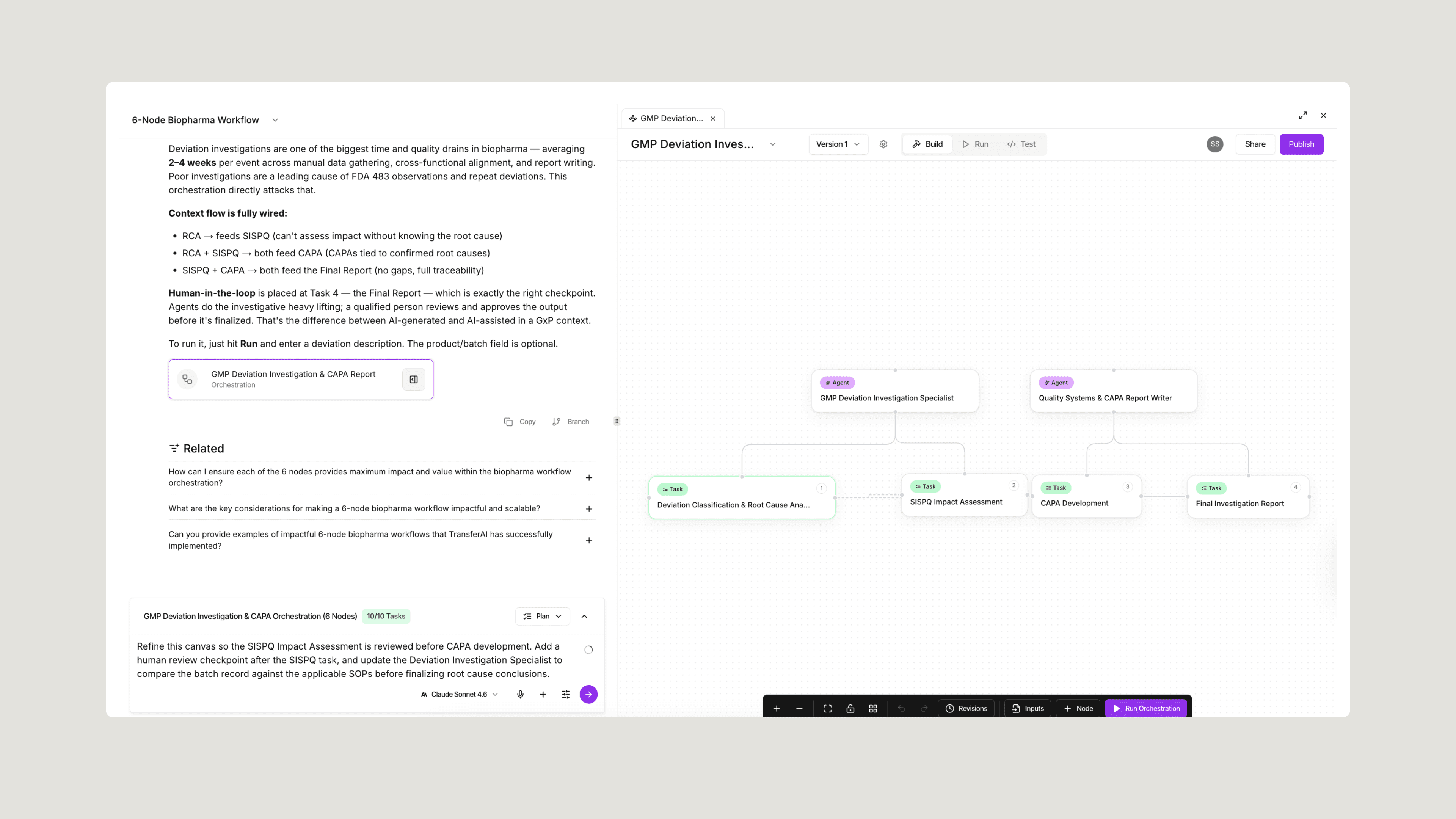
- Describe or select your workflow. Start by telling Sofie what you want to build, or choose a prebuilt orchestration from the library. Sofie turns that starting point into a structured canvas with agents, tasks, and tools. Each agent has a role, each task has a purpose, and each tool gives the workflow the capabilities it needs, from document review and file analysis to spreadsheet analysis and template drafting. The workflow takes shape visually, so you can see how each step connects before you run it.
- Review and refine the workflow. Once the canvas is created, use plain language to adjust it. Ask Sofie to add a review point, change an agent’s instructions, compare against specific SOPs, or reshape the final output. Sofie can handle all of the heavy lifting and update the workflow directly on the canvas. Simply ask Sofie to “Add a human review step before the final report is generated,” “Make the quality agent compare the batch record against these SOPs,” or “Use this example as the target format for the final output.” For teams that want more control, users can add, remove, connect, and configure agents, tasks, and tools directly.
- Add your organization’s know-how. Connect the materials that make the workflow specific to your team: SOPs, internal standards, reference documents, output examples, approved reports, templates, prior deliverables, and project files. This is what separates an orchestration from a generic AI prompt. Sofie follows your process, works from your context, and produces outputs in the structure your team expects.
- Add review points and output requirements. Define where human judgment belongs and what the workflow should produce. Start with review at the final output, then add checkpoints where they matter, like after source review, after a key task, before a conclusion is drafted, or before a customer-facing deliverable is generated. Tell Sofie whether the output should be a report, table, investigation draft, risk assessment, comparison matrix, customer update, or structured set of findings. If you have a trusted example, share it so Sofie can match the structure, terminology, and level of detail.
- Test, share, and improve. Before sharing an orchestration broadly, run it with a representative example. Review the output, adjust the instructions, and refine the workflow where needed. Once it is ready, share it with the right team members so they can run the process through a simple form without needing to understand the full workflow design behind it.
Running an Orchestration
Running an orchestration is designed to be simple, whether it is one your team built, one your team customized, or one from the prebuilt library.
- Choose the orchestration. Start from your team’s library or select a prebuilt orchestration. Each workflow card shows the purpose, required inputs, and expected output before you run it.
- Add the required context. The run form collects what Sofie needs to complete the workflow: workspace, source files, product, site, batch, template, date range, or other required inputs.
- Set the source materials and target output. Point Sofie to the right source materials and show what the final result should look like. Use a prior deliverable, preferred format, or template when you want Sofie to match a specific structure.
- Run the orchestration. Sofie executes the workflow step by step. Agents complete their assigned tasks, use connected tools, reference source materials, and pass context through the workflow.
- Review and refine. When the run is complete, your team reviews the output, makes any needed edits, and decides whether to use it, share it, export it, or refine the workflow for the next run.
Built for Regulated Environments
Orchestrations are built for the way biopharma teams actually operate: with defined processes, controlled inputs, expert review, documentation expectations, and cross-functional accountability.
That matters because regulated work cannot rely on disconnected prompts or one-off outputs. Teams need workflows that can follow a defined sequence, reference the right materials, preserve context across steps, and make it clear where human judgment enters the process.
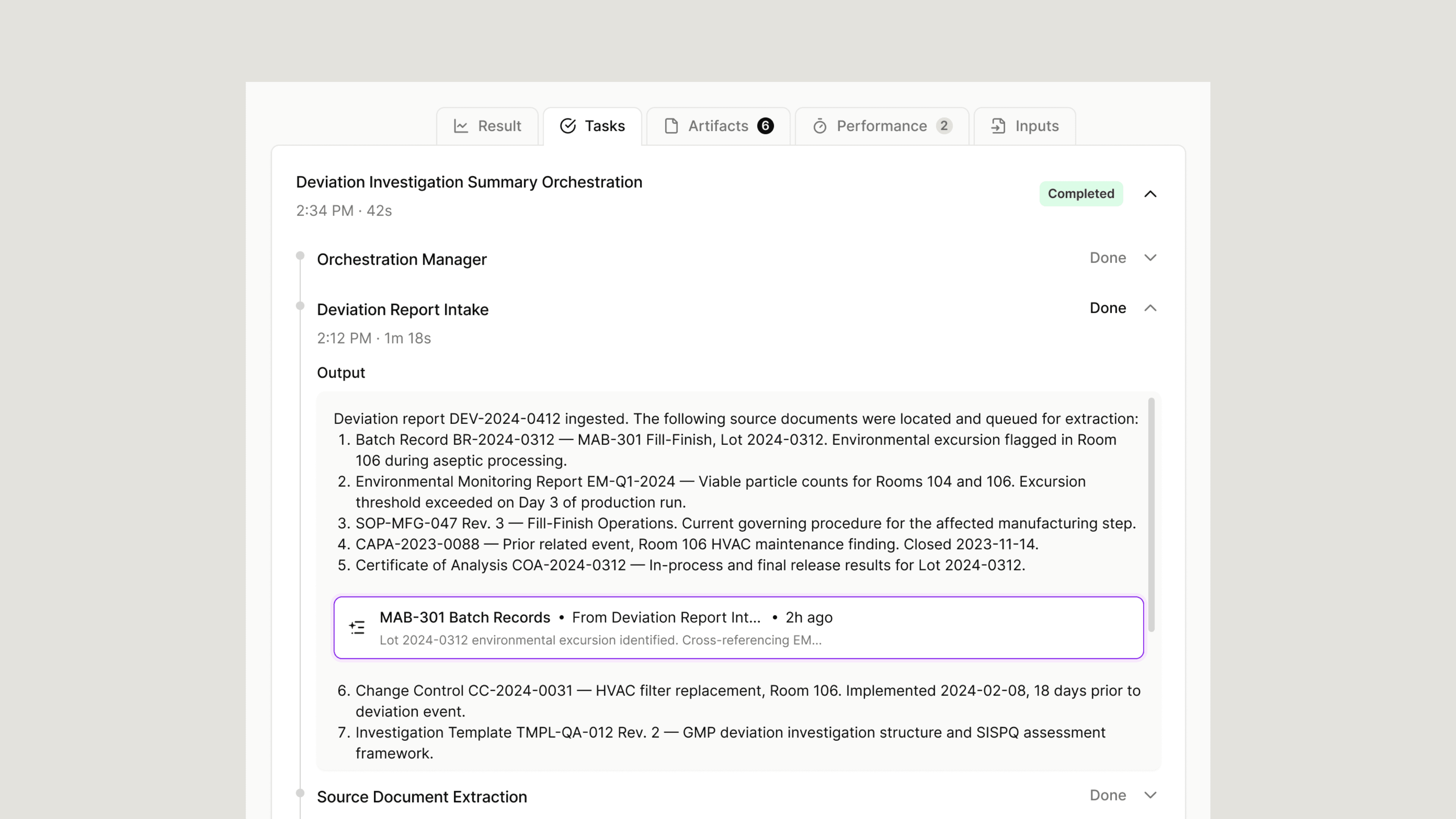
With Sofie, orchestrations can be designed with structured inputs, workspace-based source materials, human-in-the-loop review points, output requirements, and run history. That gives teams a more consistent way to execute complex work while keeping experts in control of review, interpretation, and final decisions.
“In Quality, the value is not just speed. It is consistency. An orchestration can follow a defined workflow, use the right source materials, pause for human review, and preserve a record of the run. That gives teams a clearer way to review what happened and improve the process over time.”
When You’re Ready
This launch is only the starting point. As teams build, run, and refine orchestrations, the library grows into a practical operating layer for how biopharma work gets done, with coming releases expanding the template library, improving onboarding, and deepening connections across workspaces and CoDrafts. The goal is simple: capture what your team does best and make it repeatable. Orchestrations are built to extend your team’s expertise, not replace it. Start with one workflow your organization already relies on, bring it to Sofie, and run the first version. From there, the work compounds.
Request a 1:1 and we’ll help you identify the right first orchestration for your team, or read more about orchestrations here.
Product announcements
All insights