Orchestrations
Agents that handwork to each other.
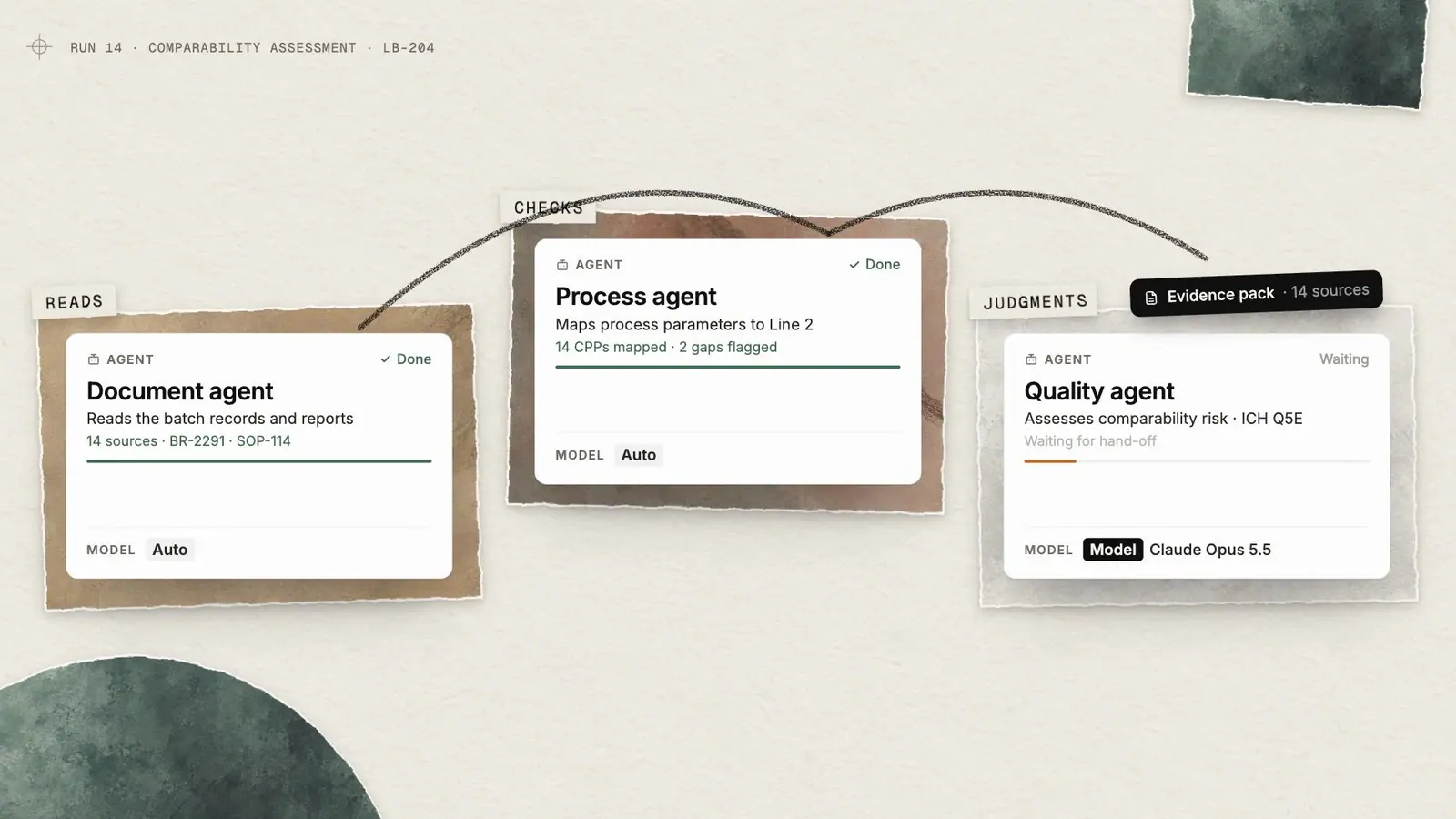
Orchestrations coordinate specialized agents across research, comparison and drafting, and pause at the review points your experts define. Runs can end in a CoDraft, a CoSheet, a filled template or a Surface.

Run · task breakdown
Acomparabilityassessmentisn'toneprompt.Itisasequenceofreads,checks,judgmentsanddrafts,withaqualifiedpersonsigningoffinthemiddle.Orchestrationsmakethatsequenceexplicit,repeatableandreviewable.
Capabilities
What Orchestrations does
01
A visual builder
Agent, task and tool nodes in a collaborative graph editor with live cursors. Run steps in sequence or under a coordinating agent, with conditions.
02
The right model per agent
Every agent defaults to Auto routing. Pin a specific model where a step calls for one.
03
Typed run inputs
Text, number, yes/no, date and option inputs, plus pickers for workspaces, meetings, CoDrafts, CoSheets, Surfaces, templates and files from SharePoint, OneDrive or Google Drive.
04
Human review points
See every step in the builder, follow live progress task by task, and pause wherever an expert needs to review.
05
Structured deliverables
Each run can produce a CoDraft, a CoSheet, a filled template, a Surface or a chat answer.
06
Proof before you publish
Publishing, revision history, sharing roles, per-orchestration memory and a test suite built from past runs.
Review points
Experts stay in the loop, by design.
Runs pause where your procedures say a qualified person must look. Reviewers see the task's output and anything missing, and can approve it, edit it or reject it before the run continues.
- Every step visible in the builder before you run
- Live progress with a task-by-task breakdown
- Most library workflows mark missing evidence instead of guessing

Run progress
Paused for reviewCollect source documents
Document agent
Map process parameters to receiving site
Process agent
Assess comparability risk (ICH Q5E)
Quality agent
- Review
QA review
Waiting for you
Draft comparability protocol
Author agent
[DATA REQUEST: receiving-site mixing time for buffer prep, step 4.2]
Workflow Library
Prebuilt workflows, ready to configure.
Start from prebuilt orchestrations across every operational area, from tech transfer to regulatory and CMC. Development, CMC and quality workflows apply ICH Q8–Q12 as their baseline, and each is configured to your procedures.
- Workflow, Author, Review, Generator and Lookup types
- Configure inputs and review points to your standards

Workflow Library
- Tech Transfer
- Process Development
- Analytical Development
- CQV
- Quality Records
- Regulatory & CMC
- Supply Chain
- Business Development
- Business Operations
Deliverables
Runs end in something you can review.
The output of a run is a document, sheet, filled template or Surface your team can edit, comment on and approve, with its sources attached.

Tech Transfer Charter · Controlled
LB-204 Drug Substance Transfer
Version 0.4 · Draft for QA review
3. Scope of Transfer
This charter governs the transfer of the LB-204 upstream and downstream process from Larkspur Biologics, Cambridge (sending site) to {Receiving site} (receiving site). The transfer covers the 2,000 L fed-batch process through drug substance release, including fill-finish operations.
4. Roles and Responsibilities
5. Process Overview
“With Sofie, our team members have completed in minutes work that would have taken hours or days. That's not a one-time thing. We've seen it across workflows, across functions. I'm a believer.”
Questions
Frequently asked
Do we have to build orchestrations from scratch?
No. The library includes over a hundred prebuilt workflows across every operational area. Configure one around your standards, or build your own in the visual editor.
What happens when evidence is missing?
Most library workflows insert [DATA REQUEST:] markers that name exactly what is missing, instead of filling the gap with a guess.
Can a run finish without anyone reviewing it?
You decide where a run pauses. Place review points wherever your procedures call for a qualified person, and check each step in the builder before it starts.
Which models do the agents use?
Each agent defaults to Auto, which routes every request to a fast, balanced or deep model. You can pin a specific model to any agent.
Works with
Part of one connected platform
Workflow Library
Prebuilt biopharma workflows for every team, ready to configure and run.
Templates
Prebuilt templates and your own formats, filled with sources attached.

Sequences
Scheduled and event-triggered work that runs while you are away.
CoDraft
Word-faithful documents Sofie drafts, redlines and cites with your team.
Start with one workflow.
Measure it. Then expand.
In a working session we choose a priority workflow, define your standards and review points, and agree how to measure speed, quality and capacity. Then you evaluate Sofie's work before deciding whether to expand.