Sequences
Work that runswhile you’re away.
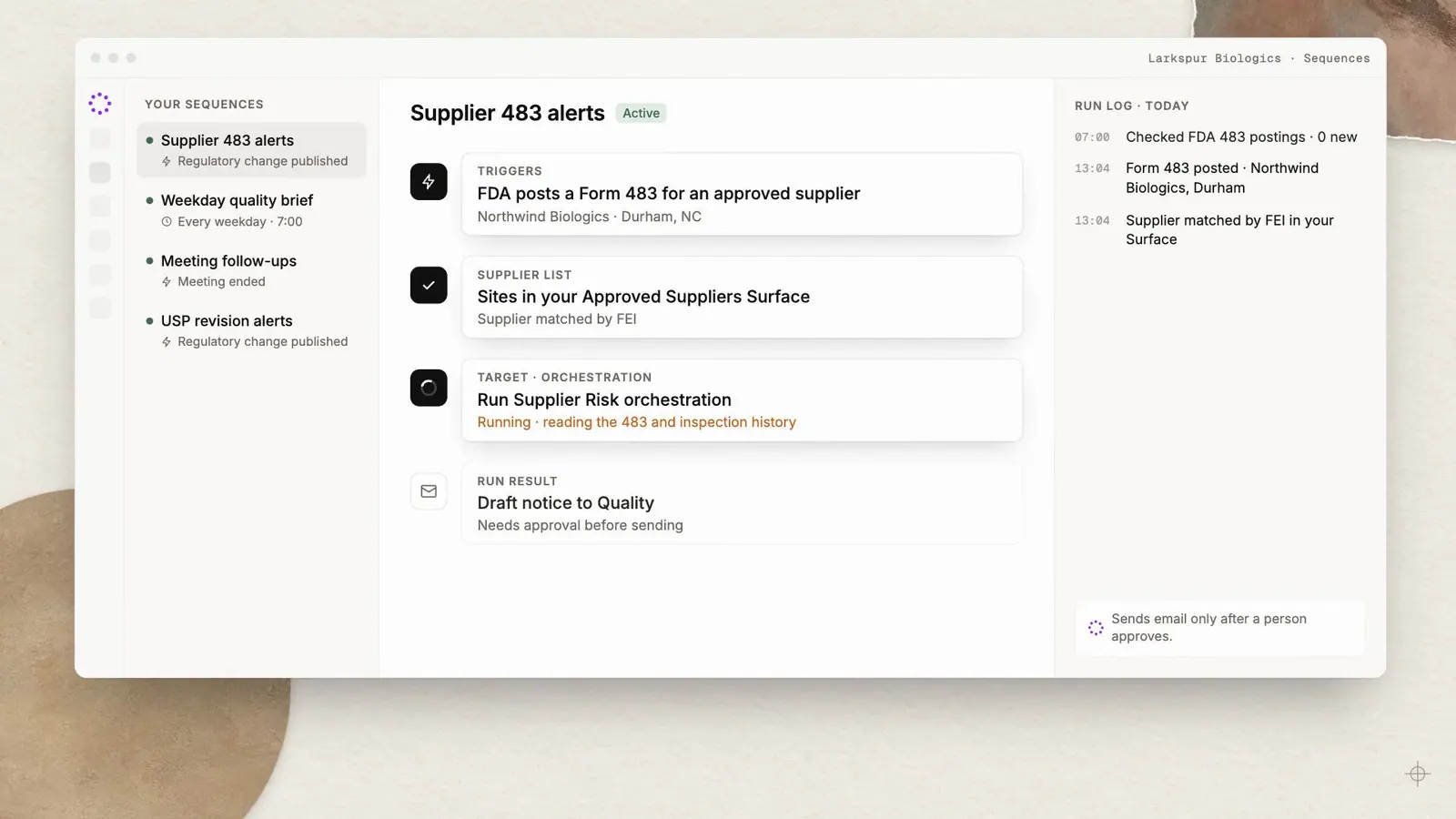
Sequences run saved prompts, orchestrations and Surface Actions on a schedule, or the moment something changes: an email arrives, a meeting ends, FDA posts a Form 483 for one of your suppliers. Anything sensitive waits for your approval.

Your sequences
Supplier 483 alerts
Regulatory change published
Weekday quality brief
Every weekday 7:00
Meeting follow-ups
Transcript ready
USP revision alerts
Regulatory change published
When
FDA posts a Form 483 for a supplier on your list
Approved suppliers · 57 sites
Then
Run Supplier Risk orchestration
Updates the Supplier risk Surface
Then
Notice to Quality, drafted by the run
Needs approval before sending
Notify if
Observations mention sterility or aseptic processing
Checked after each run
Run log · today
Checked dailyMostoperationalworkstartswithsomethingchangingsomewhereelse.Sequencespickupthechange,dothefirstpassofthework,andbringyouonlywhatneedsadecision.
Capabilities
What Sequences does
01
Schedules
Run once at a set time, or on a recurring schedule: the Monday supplier review, the month-end quality metrics, the quarterly program readout.
02
Schedules and event triggers
Email received or replied, calendar changes, meeting ended, transcript ready, Surface records changed or due, orchestrations completed or failed, files processed and regulatory changes published.
03
Regulatory alerts
Hear when FDA posts a Form 483, Warning Letter or OAI classification for one of your suppliers, when a Phase 1 oncology trial registers, or when USP publishes a revision.
04
Approval by default
Sending email, writing to calendars, updating Salesforce and team messaging pause for human approval. Optional pre-approvals expire.
05
Only tell me when
Conditional notifications in the app, by email or by push, quoting the evidence that triggered them and suppressing repeats.
06
Runs what you've already built
A Sequence can run a saved prompt, an orchestration from the library or your own, or a governed Surface Action.
Regulatory alerts
When a supplier’s 483 is published, the review is already started.
Tell Sofie which suppliers and sites matter. When a Form 483, Warning Letter or OAI classification is published for one of them, a Sequence reads it and notifies you with quotes from the official source.
- Recall, shortage and enforcement feeds checked every six hours
- “Regulatory change published” as a trigger for any Sequence
- Evidence quoted in every notification

Researching across 9 authorities
Sources · official records
Inspection classification · Basel · NAI
fda.gov/inspections-compliance…
EudraGMDP certificate · Keller Pharma AG
eudragmdp.ema.europa.eu
Form 483 · Alameda, CA · Jun 2026
fda.gov/…/foia-electronic-reading-room
Guidance · Sterile drug products, aseptic processing
fda.gov/regulatory-information/…
SPL · establishment listing · Keller
dailymed.nlm.nih.gov
Approvals
Nothing leaves without a person’s say-so.
Unattended work is useful until it sends the wrong email. Sequences pause at every sensitive step, show you exactly what is about to happen, and continue only when someone approves.
- Email, calendar, Salesforce and team messaging need approval by default
- Optional pre-approvals that expire
- Runs wait, rather than fail, while approval is pending

Approval needed
Run pausedTo supplier.quality@keller-pharma.example
Subject Request for 483 response and CAPA timeline
Triggers
From meeting to minutes, without a reminder.
Connect the events your teams already react to. A finished kickoff drafts its minutes, a CAPA reaching its effectiveness-check date prompts the owner, and a failed orchestration tells the person who built it.

Meeting ended
Draft minutes from the Tech Transfer notes template
Transcript ready
Update action items on the program tracker
Email received
From a client, about a change request
Surface record due
CAPA effectiveness check due today
Regulatory change published
EU GMP Annex 1 or 21 CFR 211
Orchestration failed
Notify the owner with the failing step
Questions
Frequently asked
Are Sequences email campaigns?
No. Sequences are background automations that run saved prompts, orchestrations or Surface Actions on a schedule or trigger. Sending an email can be one step, and it waits for approval by default.
What needs approval?
Sensitive tools, including sending email, calendar writes, Salesforce and team messaging, require human approval by default. You can grant a pre-approval that expires.
How do I avoid noisy alerts?
Use conditional notifications: describe when you want to hear about something. Sofie quotes the evidence that met the condition and suppresses repeats.
Which regulatory events can I watch?
Sequences can trigger when Regulatory Intelligence publishes a change, for example a Form 483, Warning Letter or OAI for an approved supplier, a new trial registration, or a USP revision notice.
Works with
Part of one connected platform

Orchestrations
Specialized agents coordinated across multi-step work, with human review points.

Regulatory Intelligence
Nine authorities, cited and monitored every day.
Surfaces
Decks, dashboards, pages and live trackers built from a conversation.
CoMeeting
Live transcripts, notes and follow-through for every working session.
Start with one workflow.
Measure it. Then expand.
In a working session we choose a priority workflow, define your standards and review points, and agree how to measure speed, quality and capacity. Then you evaluate Sofie's work before deciding whether to expand.