Sequences Are Here: Work That Keeps Moving
Sofie Sequences now give useful prompts and orchestrations a layer of automation to streamline repetitive work and simplify your workload.
TransferAI Team6 min read
Biopharma work is rooted in repetition.
A drug development or manufacturing project can span years. Teams change, documents are revised, deviations are investigated, and earlier decisions shape what happens next. Yet the work still follows a defined sequence of stages, decisions, and handoffs.
Still, most biopharma teams start over each time a new project begins. They review the latest information, make a decision, document the outcome, or create an analysis. The work then moves through an iterative review process before it can proceed. The next task begins, and the cycle repeats: the same forms, files, and setup work are recreated again and again.
This repetition carries over to the weekly project summaries at the end of every week, follow-ups written after every meeting, and check-ins at the start of the day. In biopharma, timing matters. Sofie has gotten you part of the way there with orchestrations that can run complex workflows from start to finish.
Today, we’re introducing Sequences.
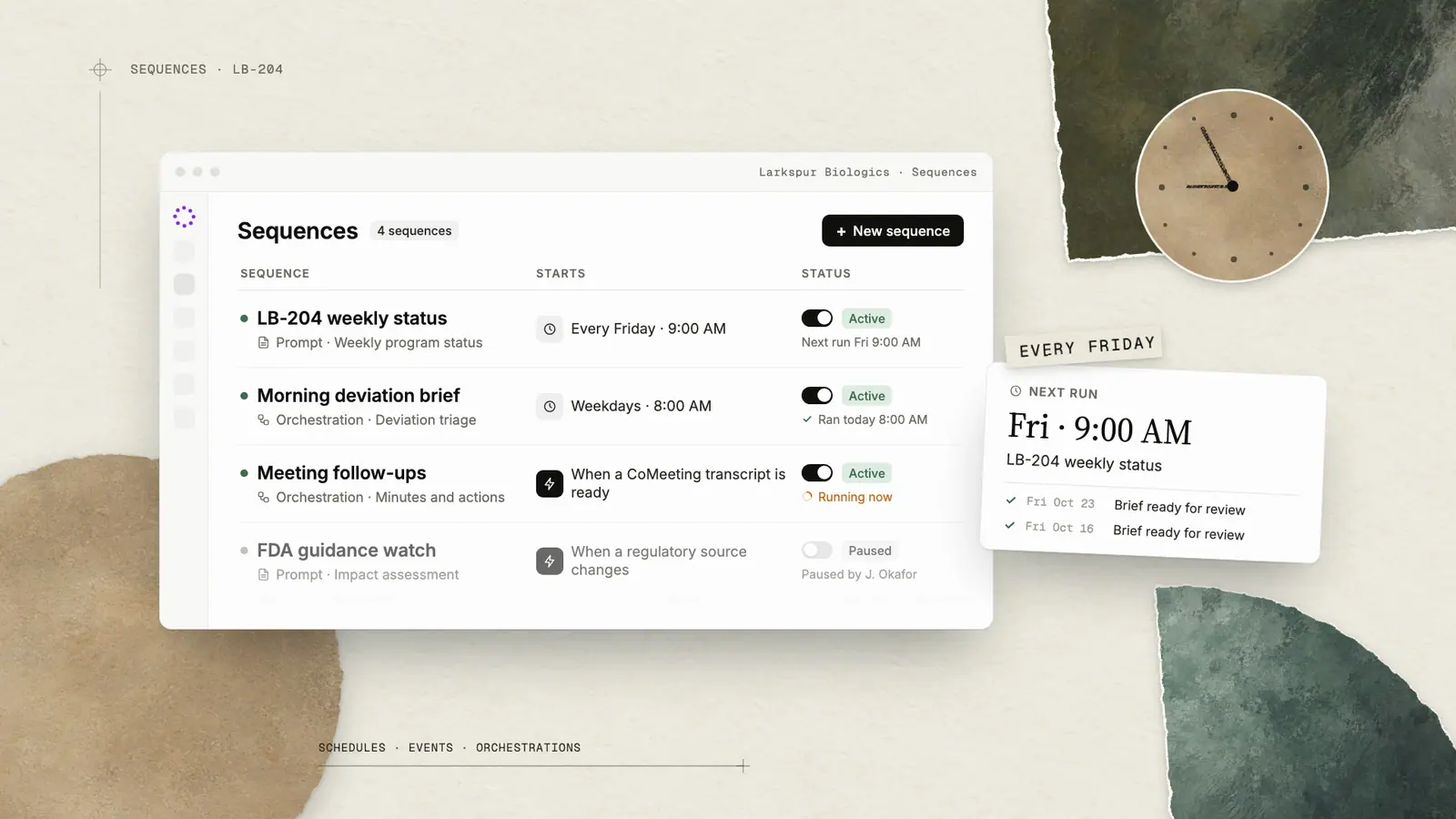
Sequences allow Sofie to keep useful work moving after the initial interaction. A Sequence can run a saved prompt or structured orchestration manually, on a schedule, or when a defined event occurs. It can run once in the future, repeat on a recurring cadence, or continue across multiple stages of a process as new information becomes available.
Each run uses the configured inputs and available project context, along with Sofie’s intelligence, under conditions you define. When an action requires approval, you remain in control. Sofie can request review, apply approved permissions within their defined limits, and retain a visible history of what happened.
That changes how work gets done. Teams can spend more time on the work that requires their expertise and less time managing the repetitive tasks that consume their time and resources.
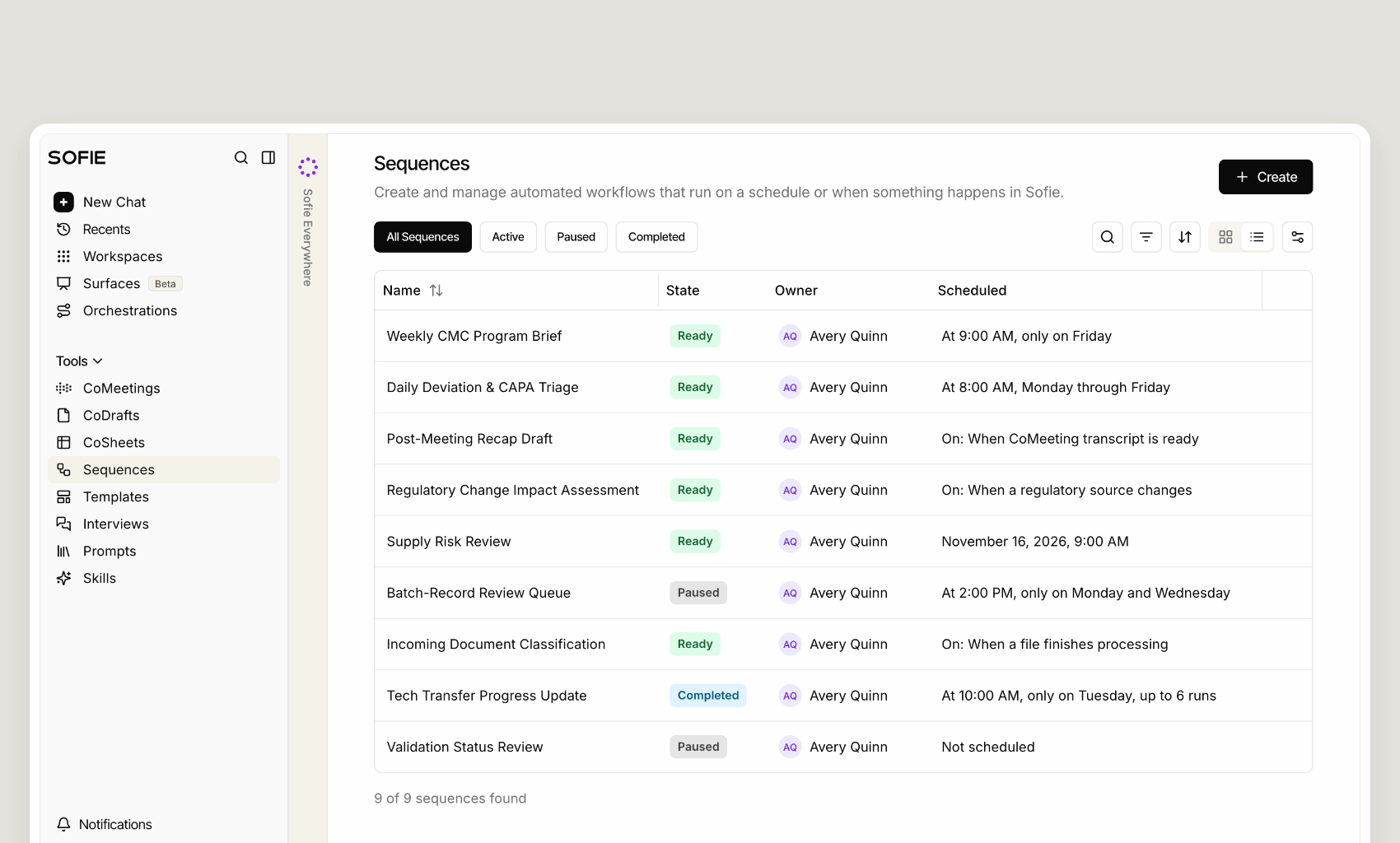
Sequences start with the orchestrations that are already there
What a Sequence needs to know is straightforward: what work to run, what inputs to provide, what approval policy to follow, and when the work should begin.
A Sequence can run a saved prompt or a structured orchestration. The orchestration contains the workflow itself: the agents, tasks, tools, context, decision points, and outputs. A Sequence configures when that work runs and how each run should be handled—whether it is started manually, scheduled for a future date, repeated on a recurring cadence, or initiated when a defined event occurs.
Instead of remembering to start the same work over and over, teams can configure it once and let it run when needed, with human approval wherever it is required.
This connection is where biopharma work moves forward. A Sequence passes its configured inputs into the saved prompt or orchestration, which runs using its available project context, instructions, tools, and review points. When the work is complete, the output is available for human review. When paired with the right saved prompt or orchestration, Sequences can be used to:
- Run weekly account, project, or compliance reviews
- Start personalized outreach when a deal, program, or partnership changes stage in a Surface
- Continue or stop follow-up based on dates and replies
- Create follow-up materials when a meeting transcript is ready
- Process or classify documents when they enter a workspace
- Monitor regulatory sources and initiate an impact assessment when something changes
- Alert an owner or begin the next approved remediation step when another workflow fails
- Turn a successful chat prompt into a reusable automation
The actions available to a Sequence remain governed by the configured tools, scoped permissions, and human review points of the underlying saved prompt or orchestration. Availability of connected-system triggers and actions depends on the integrations enabled, configured tools, and permissions.
For the first time, Sofie can start workflows automatically
Sequences tell Sofie when to do the work it already knows how to do. That work can begin with a saved prompt or an orchestration, and the quality of each run depends on the instructions, inputs, and review points behind it.
Until now, Sofie has relied on a user to manually begin a run. Now, a Sequence can keep the same defined work moving once at a future date, on a recurring cadence, or when a defined event signals that it is time to continue.
A weekly CMC program brief can run every Friday. Daily open-item triage for deviations, CAPAs, or batch-record review can run each morning. A meeting follow-up can begin when the transcript is ready. A project review can continue when a follow-up date arrives or new information is added.
To create a Sequence:
Start with work that is already reliable and properly configured. A Sequence creates value when the saved prompt or orchestration behind it has the right instructions, context, review points, and intended output.
- Give it a name—Start with a name that makes the work immediately recognizable. A clear name helps the right people understand what will run, why it matters, and where it belongs in the life of the project.
- Describe the purpose—Add a short description that captures the work the Sequence will keep moving: the weekly summary that keeps a program aligned, the follow-up that keeps a decision moving, or the review that begins when new information becomes available.
- Choose the work—Select the saved prompt or orchestration that will do the work. This is where the Sequence connects to a useful interaction or process your team has already built, carrying forward its instructions, configured inputs, and review points each time it runs.
- Set it in motion—Choose how the work should begin. Start it manually when needed, run it once at a future date, repeat it on a recurring schedule, or have it begin when a defined event occurs—such as a Surface record or field changing, a follow-up date arriving, an email or reply being received, a meeting ending or its transcript becoming available, a file finishing processing, or a regulatory source publishing a change.
- Define the controls—Review the inputs, approval policy, and actions the Sequence may take. You can keep a Sequence paused until the configuration is ready, then activate it when the work is ready to continue.
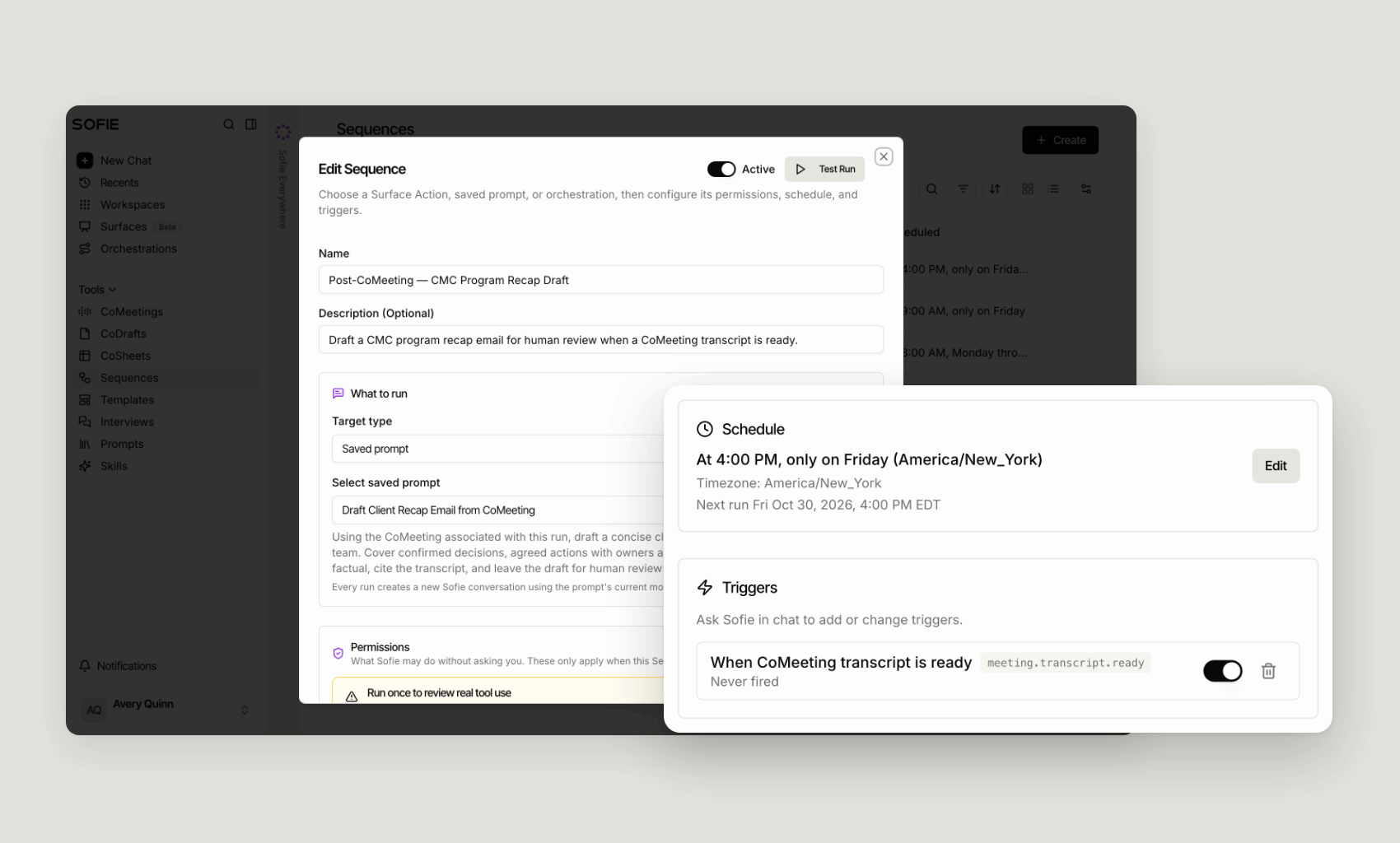
Before activating a Sequence, review its trigger, inputs, and approval policy. You can approve eligible actions within a defined scope and time period so future runs can proceed without unnecessary interruption. For approval-gated actions, event-triggered runs require separate authorization and an applicable daily usage ceiling. If a run reaches a required review point, is missing an input, reaches a usage limit, or needs authorization that has not been approved, Sofie pauses the run for human review rather than proceeding automatically.
When the work is ready, Sofie keeps it moving
In practice, this is what changes when useful work no longer has to be manually restarted. You open Sofie on Monday morning, and the weekly CMC program summary has already run. It has organized the latest program updates, surfaced open risks and pending decisions, and created a review-ready readout in the format your team expects.
Another Sequence can begin when a meeting transcript is ready, a follow-up date arrives, or new information is added to a project record. It can create the next configured output or initiate the next approved step, while keeping the work that requires judgment in human hands.
You did not have to remember to start the workflow, re-enter the configured context, repeat the instructions, or route each step yourself.
Sequences bring timing and continuity to the work your team has already configured. Saved prompts and orchestrations carry the instructions, tools, inputs, permissions, and review points that govern each run, along with its available project context—so recurring and event-driven processes can remain consistent without losing the controls that matter.
The work uses its configured context. Your process carries its controls. Sofie keeps a visible history of what happened.
Ready to schedule your first Sequence? Create one in Sofie, or schedule a 1:1 with the TransferAI team for help choosing the right orchestration and cadence for your workflow.
Product announcements
All insights