Sofie at Work: How to Go from Business Problem to Production-Ready Salesforce Code
In this article of Sofie at Work, see how to prompt Sofie with a business problem and deploy custom Salesforce automations to production, faster.

TransferAI Team
Sofie at Work is our series where real users share ways in which they are implementing Sofie at their site. This article features Peter, a Business Dev Operations Analyst at Woodstock Sterile Solutions and Halo Pharmaceutical, where Salesforce sits at the center of commercial operations and feeds downstream into QMS systems. We discuss how Sofie has replaced an outsourced development workflow that had constrained him for years and unlocked a pace of execution he describes as insane.
For any dev ops analyst, managing a deep CRM means monitoring deployment pipelines, infrastructure costs, system uptime, and incident response metrics that directly impact delivery timelines and operational reliability. Surfacing those details in a system like Salesforce, though, usually requires custom programming to build a function.
Sofie makes that process faster, more consistent, and easier to repeat. Describe your business problem directly in Sofie and generate working Apex code, test coverage, and production-ready automations without a specification document or a developer. Sofie produces deployable code far faster than any outsourced workflow, so analysts can move changes through their existing review and approval process in days instead of months.
From Six Months to Six Weeks
At Woodstock Sterile Solutions and Halo Pharmaceuticals, Peter built, tested, and deployed five major Salesforce automation projects in six weeks. His estimate for completing the same projects through a traditional developer workflow, running them in parallel with a full team, was six months, including all the testing, back-and-forth, and scope changes that come with outsourced development. That is a 75% reduction in delivery time and an estimated 65% reduction in development costs, while giving leadership real-time visibility into salesperson activity that would have otherwise been six months away. In a biopharma commercial operation, that kind of delay doesn't just slow execution — it creates gaps in the downstream data that quality systems and commercial teams depend on.
"In the last six weeks, I've pushed five major projects into production. I could never have done that with a team of developers. I can do things as an admin that I never ever would have even thought about doing because it would have meant going through a formal budget approval process and then writing down exactly what I wanted. With Sofie, I tell her what I'd like to do, five minutes later I have an answer, and 95% of the time the code works right out of the gate," says Peter.
1. Replace the Developer Workflow with Plain Language Prompts
Sofie eliminates the need to file a formal proposal, flowchart, and cost justification to upper management and the subsequent weeks of back-and-forth and inevitable scope creep with a developer before anything landed in production. The result is faster implementation and less overhead. For Peter, this means prompting Sofie to build and deploy Salesforce automations by describing the business problem and Salesforce's minimum deployment threshold — not the code he wants written. Sofie generates working Apex code and the required test coverage. For visual work, a screenshot of the desired output replaces a written specification entirely. Once the code is in production, Peter also uses Sofie to generate plain-language documentation explaining how each solution works — creating a reference for the next Salesforce admin who inherits it. This turns every deployment into a documented, transferable asset rather than tribal knowledge.
2. Fix Interface and Layout Issues Using a Screenshot
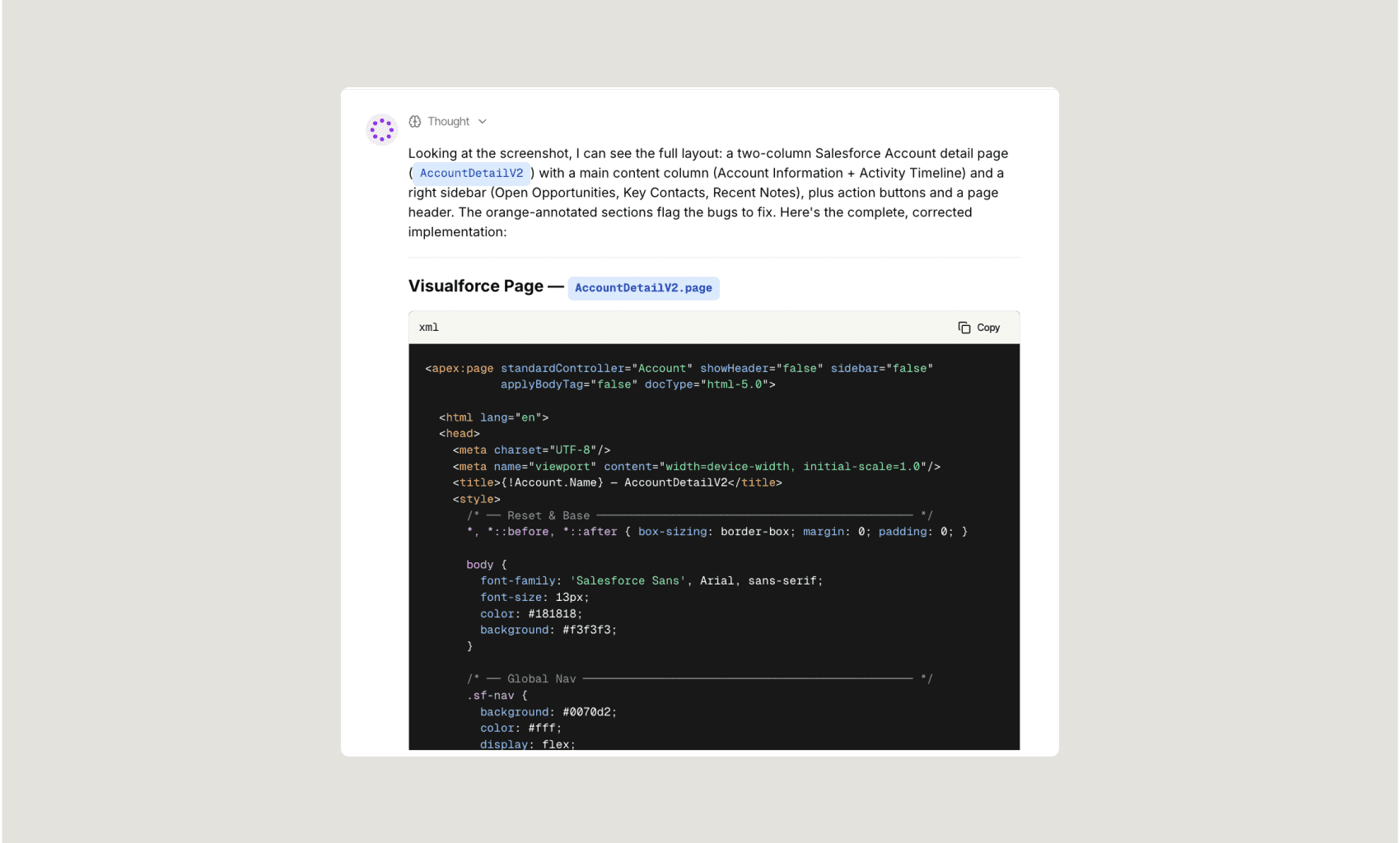
For visual and interface-level problems in Salesforce, including bugs, layout issues, and custom Visualforce Pages, Sofie eliminates the need for a development proposal cycle and its associated costs, enabling Peter to fix these things directly. With Sofie, a screenshot of the desired output replaces a written specification entirely. He describes what he wants the interface to look like, attaches the reference image, and Sofie generates the matching Visualforce markup, CSS, and HTML. Issues he had simply lived with are now sometimes resolved in a single session. The result is reduced friction and a clear path through Salesforce.
3. Solve Complex Reporting Problems with Custom Object Logic
For reporting problems that required custom logic and cross-object mapping, Sofie eliminates the need to architect a solution before writing a single line of code. Peter's challenge was one he worked around for years: their instance of Salesforce allows activity to be logged four different ways: tasks, Outlook emails, Outlook calendar events, and a custom sales call report object. Each captures real data, but no single report could pull them all together because sales call reports are a custom object, separate from tasks and events. He described the problem to Sofie, worked through several approaches together, and landed on a solution. Sofie built an Apex trigger that auto-generates a task every time a sales call report is created, mapping key fields so all activity consolidates into one view. The result is a single, real-time activity report for the VP of Sales and CEO, without Peter needing to figure out the underlying logic on his own. For a pharma company where Salesforce feeds downstream into QMS systems, that unified activity view also means cleaner, more reliable data flowing into the quality systems that commercial operations depend on.
Building What You Could Never Justify Before
Describe your end goal and then prompt Sofie to write working code and test code to execute your workflow. In the example above, Peter details his problem and asks Sofie to write working code that meets Salesforce's requirements: at least 75% test coverage, passing test methods with assertions, bulkified logic, governor limit compliance, and no hard-coded record IDs before anything can be pushed to production.
Sofie writes the working Apex code and test code directly in the chat, structured to meet Salesforce's deployment requirements from the start. You'll see both the trigger logic and the test class side by side, with inline comments explaining what each section does and why. This way, you're able to review, adjust, and deploy with confidence — without needing to interpret raw code or troubleshoot coverage errors yourself. You can then copy the code directly into the Salesforce development environment in seconds.

By reducing the administrative overhead and project coordination with a developer, Sofie helps DevOps analysts like Peter operate more proactively and effectively. Now Peter spends his time directing work rather than managing a developer — and in doing so, he's given leadership a more comprehensive, real-time view into sales data, management visibility, and the ability to close deals more efficiently with direct, up-to-date visibility into salesperson activity.
Want to move from problem to working tool without the developmental bottleneck of finding a developer, writing a proposal, and moving through an approval chain? Talk to our team about what Sofie can build for you.