The Transfer: October 2026
Welcome back to The Transfer. This month, we’re introducing Sequences to schedule or trigger saved prompts and orchestrations when you need them. We’re also introducing Sofie Academy to help you build confidence using Sofie, and Sofie Voice for hands-free conversations. Additional improvements make orchestrations easier to understand and configure, while updated organization settings, archive access, and richer branding create a cleaner, more cohesive Sofie experience. Here’s what’s new.
TransferAI3 min read
Have a Real Conversation with Sofie via Sofie Voice
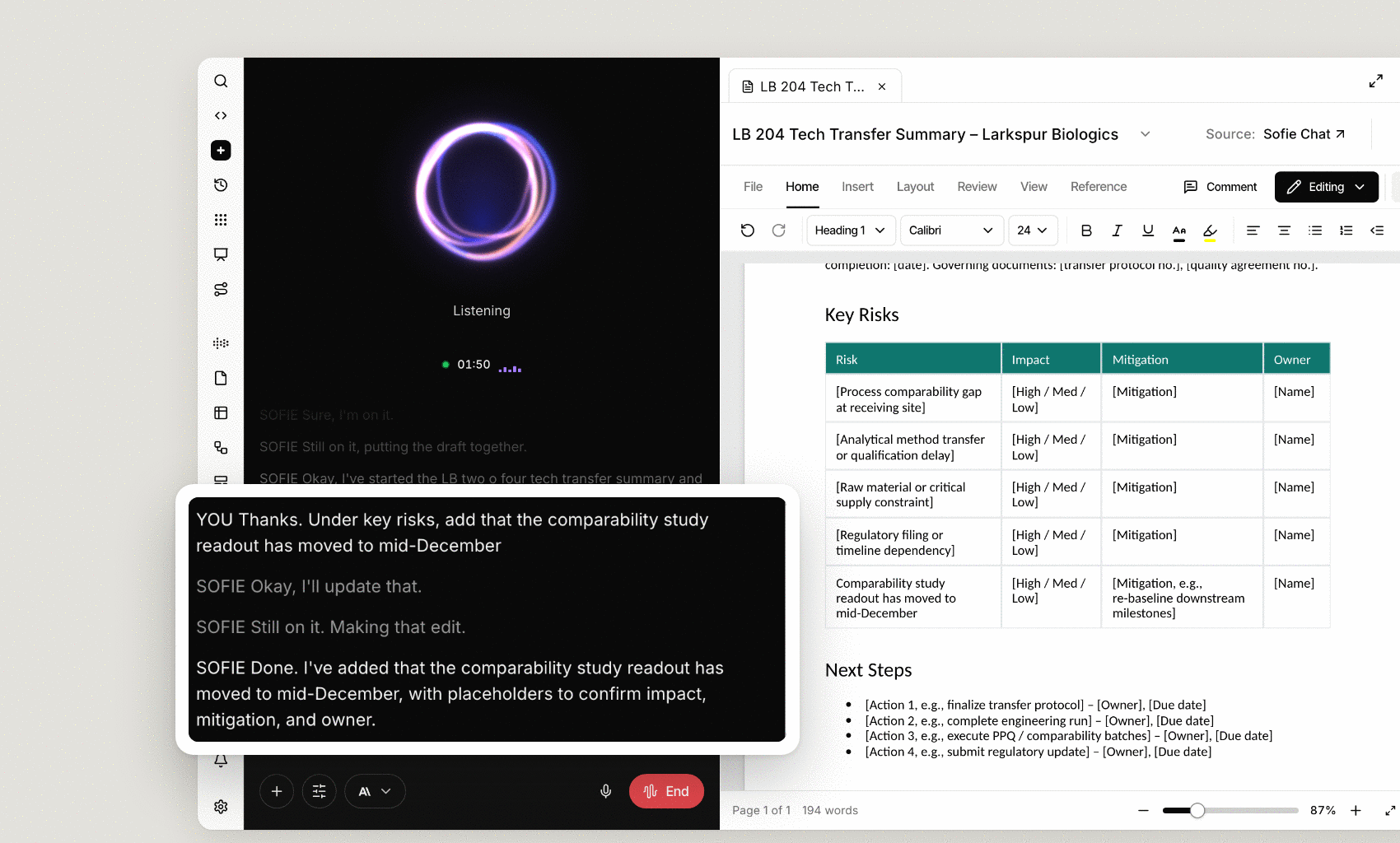
Sofie Voice gives you a hands-free way to work with Sofie. Speak naturally to ask a question, describe a document change, or work through a task while Sofie uses its tools to carry the work forward. CoDrafts, CoSheets, and Surfaces open beside the conversation, so you can see the work as it takes shape and make corrections out loud. You can interrupt to redirect Sofie and review the results as you go. For actions such as sending an email, Sofie asks for your approval before proceeding. This lets you stay focused on the work in front of you while keeping your expertise and judgment at the center.
Learn more with Sofie Academy
Sofie Academy supports ongoing education for teams that want to deepen their knowledge of Sofie and make more of the platform. Through tutorials and best practices, you can build skills over time and apply what you learn to your work. You can also work toward certification to demonstrate your knowledge of Sofie as your experience grows. Whether you’re learning a new capability or refining how you use an established one, Academy helps you build confidence and expertise. To open Sofie Academy, go to your account menu, select Support, then choose Sofie Academy.
Pair the Power of Sequences with Orchestrations and Prompts to Automate Work
Sequences run saved prompts or orchestrations on a schedule or in response to a defined event. The prompt or orchestration defines the work; the Sequence determines when it starts. Choose the timing, recurrence, time zone, and inputs for your workflow. Approval-gated actions pause for review unless an appropriate permission has been granted. Teams can review run status and results. Learn more →
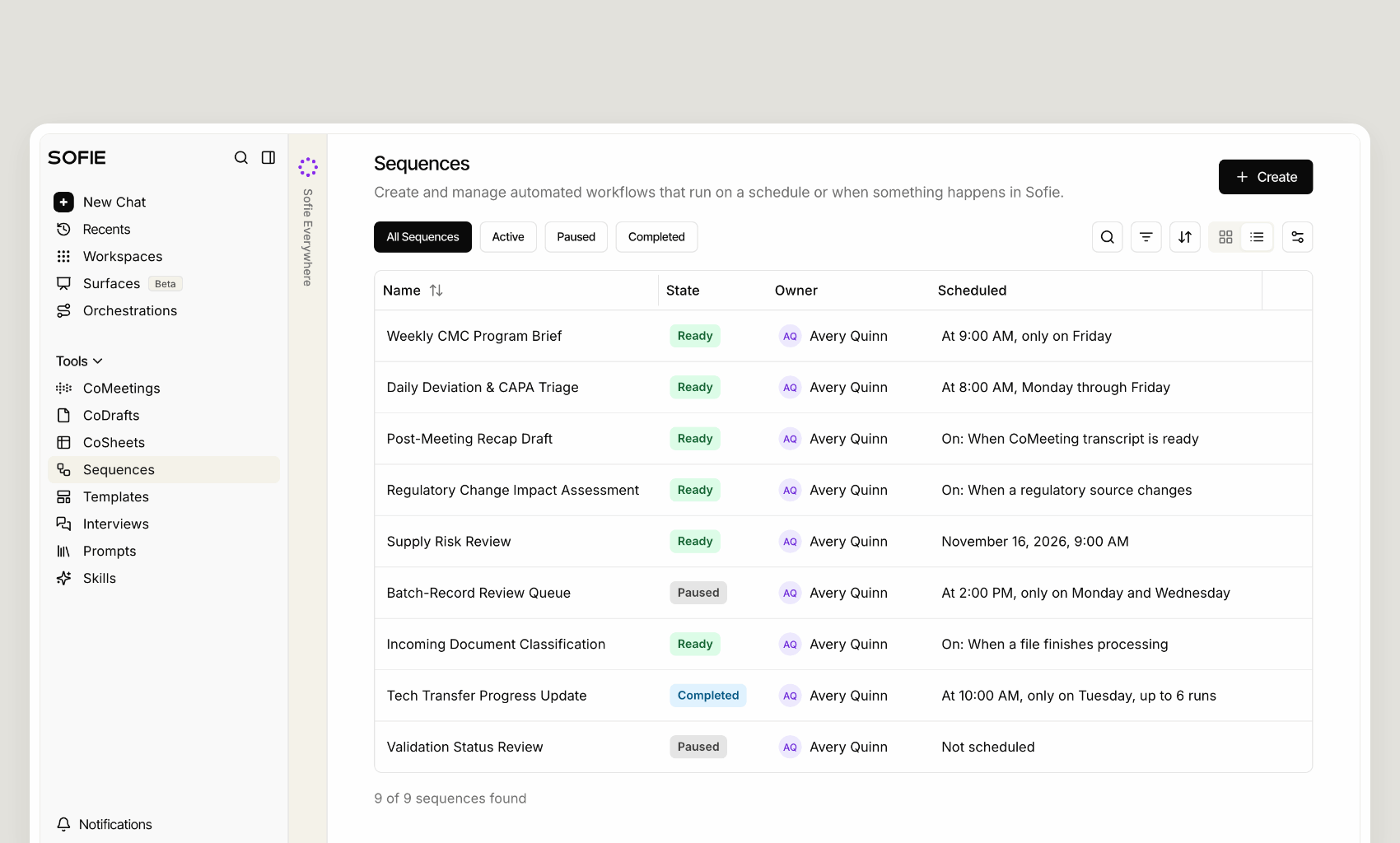
Bring the Power of Sequences to CoMeeting
Keep work moving after a meeting by triggering a configured Sequence when a CoMeeting transcript becomes available.
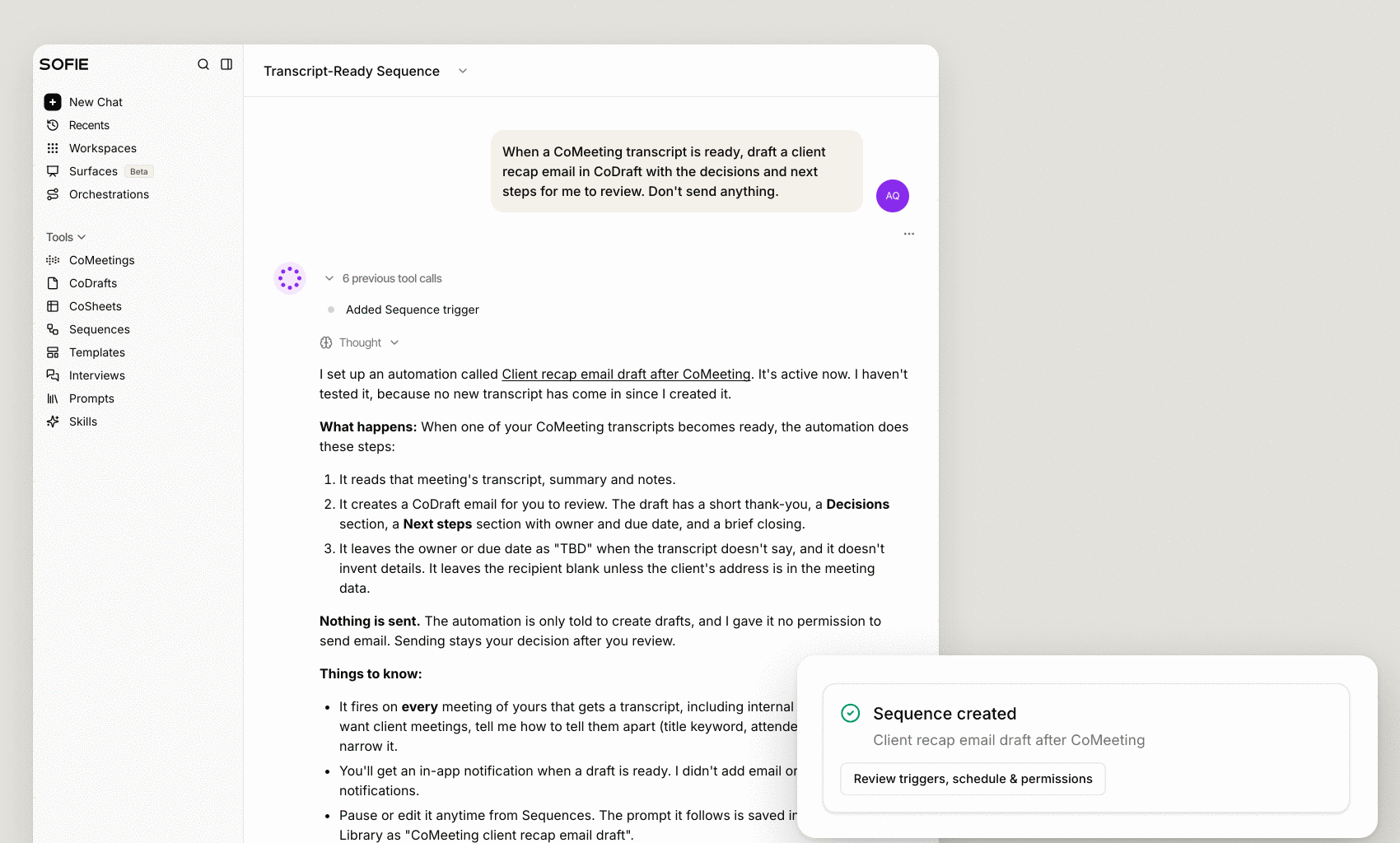
Bring the Power of Sequences to Surfaces
Turn information from across Sofie into polished, shareable work by using a Sequence to run a configured prompt or orchestration that updates a Surface. Start with meeting summaries, files, regulatory updates, workspace changes, or other connected workflows, then automatically update a configured Surface feed.
Richer and more Powerful Orchestrations
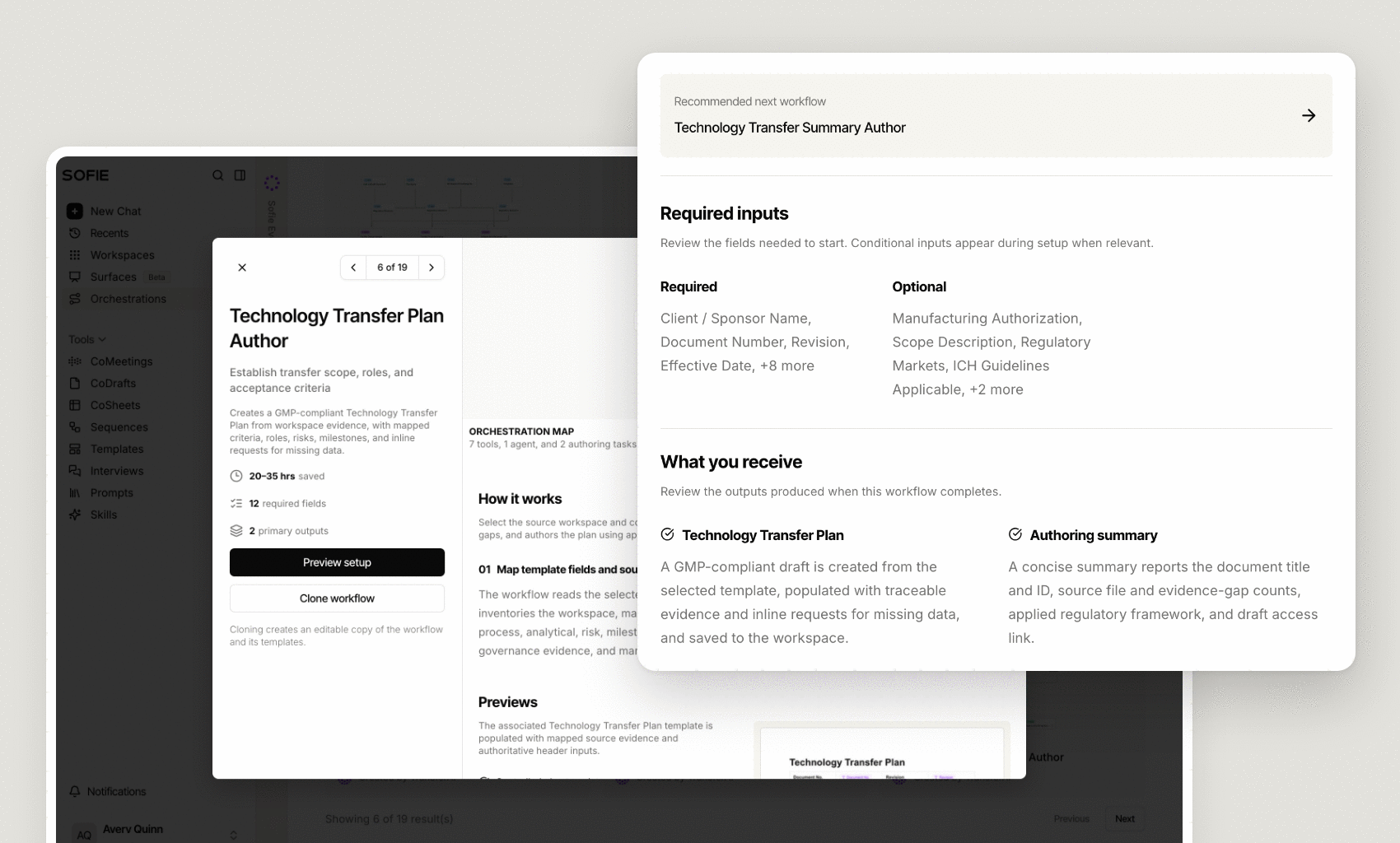
A new design helps you see how each orchestration in Sofie compares and makes it easier to understand what each orchestration supports and choose the right workflow for the work ahead. We’ve also brought in clearer architecture previews, specific technical details, and outlined expected artifacts on input.
Restructured Workflow Cards
Choose the right orchestration before you run it. Updated workflow cards clarify each workflow’s purpose, required inputs, and expected outputs, with a preview of the setup and related workflows in the same category.
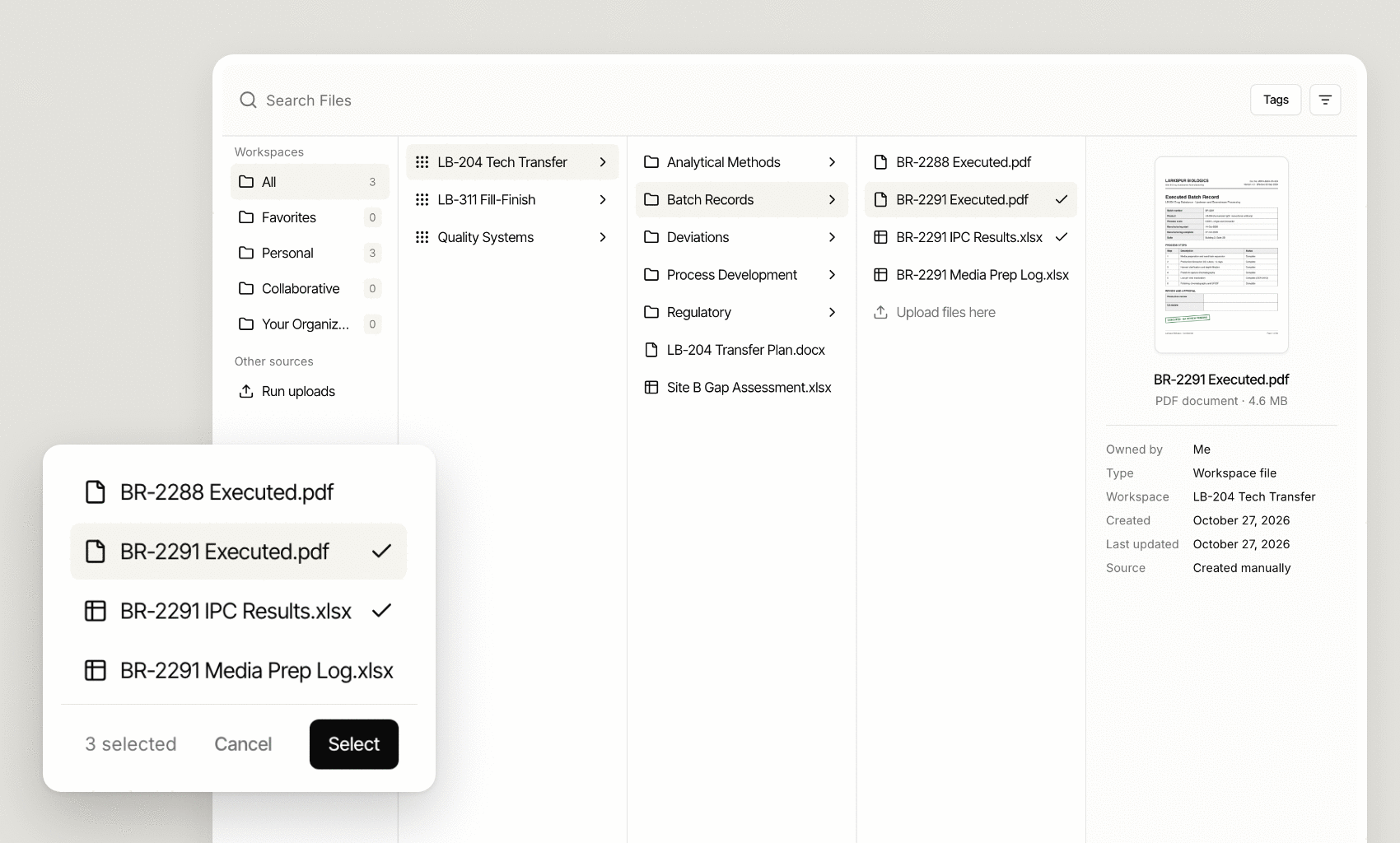
Simpler File Selection for Orchestrations
Find the right content faster when you run, clone, or edit an orchestration. A redesigned file selector makes it easier to browse and choose DMS workspaces, folders, and files, so each workflow starts with the right inputs.
See Controls When They Are Ready to Use
The orchestration edit and run bar now stays hidden until the first build is complete. This keeps revisions, inputs, node controls, and run actions out of the way until there is an orchestration ready to edit.
Cleaner Organizational Settings and Branding
New organization settings give teams a clearer way to manage shared preferences across Sofie, centralizing the controls that shape how your organization works, presents itself, and manages retained content.
Archive Access
With appropriate permissions, restore eligible deleted CoDrafts and workspace items for up to 30 days if content was deleted by mistake or is needed for reference.
Richer Organizational Branding and a More Focused Sofie Interface
Apply your organization’s branding more consistently across Sofie and the work you create. The interface now uses less of Sofie’s default purple and gives your organization’s visual identity more room to lead, creating a cleaner and more cohesive experience across the platform.
What This Means
This release helps teams move repeatable work forward with less manual coordination. Sequences let you schedule or trigger orchestrations and prompts when the right input, event, or moment occurs. Clearer workflow details, restructured cards, and streamlined input selection make it easier to choose and configure the right orchestration for those automated workflows. Sofie Academy helps you build confidence using Sofie, while Sofie Voice gives you another way to work with Sofie hands-free. Together, these updates make it easier to put Sofie to work and keep work moving.
The Transfer newsletter
All insights